
Getting found

How to get your business on Google for free

Three free tools put your business on Google Search and Maps. Here's how to set up each one in an afternoon, and the small habits that help you climb the results.

The Zertle team5 min read

A smiling café owner checking her business listing on a phone behind the counter

When someone nearby searches for what you do, you want your business to be one of the first things they see. The good news: getting your business on Google is free. You don't need to pay for ads or hire anyone. You just need to tell Google who you are, where you are and what you offer, in the places it looks.

This guide covers the three free tools that matter most, in the order to set them up, plus the small habits that help you climb the results over time.

The three places Google gets to know your business

  • Google Business Profile: the box with your hours, photos, reviews and map pin that appears in Google Search and Google Maps.
  • Your website: the pages Google reads to understand what you do and decide when to show you.
  • Google Search Console: a free dashboard that shows how Google sees your website and which searches find it.

You can do all three in an afternoon. Let's start with the one that gets you on the map.

Step 1: Create your free Google Business Profile

Your Business Profile is often the very first thing people see when they search your name or "near me". It's what puts you on Google Maps.

  1. Go to google.com/business and sign in with a Google account you'll keep using for your business.
  2. Type your business name. If Google already has a listing for you, choose it and claim it.
  3. Pick the category that best describes your main service, like Florist, Plumber or Hair salon. You can add more later.
  4. Add your address if customers visit you. If you go to them, add the areas you serve instead and hide your address.
  5. Add your phone number and website address.
  6. Verify your business. Google will ask you to prove it's yours, usually with a short video, a phone or email code, or a postcard.

Make your profile stand out

  • Fill in everything: opening hours, holiday hours, services, prices and a short description in your own words.
  • Add real photos: your shopfront, your team, your work and your products. Profiles with photos get more clicks.
  • Ask for reviews: send happy customers a link and reply to every review, good or bad, politely and briefly.
  • Post updates: share offers, events and new work from your profile. It shows Google you're active.

Step 2: Make your website easy for Google to understand

Your Business Profile links to your website, and Google reads your website to decide which searches you should appear for. A few simple things make a big difference:

  • Say what you do and where, in plain words. A heading like "Wedding florist in Bath" tells Google far more than "Welcome".
  • Give each page a clear title and description. These are what appear in the search results, so make them specific and inviting.
  • Use the same name, address and phone number everywhere. On your website, your Business Profile and any directories. Matching details build trust.
  • Give each main service its own page or section, so you can show up for each one.
  • Make it fast and work well on phones. Google ranks fast, mobile-friendly sites higher.

If your site is built with Zertle, much of this is done for you: your pages are fast, Google gets your business details in the format it understands, and the publish check points out missing titles and descriptions. Fill in Local search (Google) in your site settings so your address, hours and service areas are included. Our earlier guide, how to make a website for your small business, covers this in more detail.

Step 3: Connect Google Search Console

Search Console is Google's free dashboard for website owners. It shows which searches bring people to your site, how many click through, and anything stopping a page from appearing.
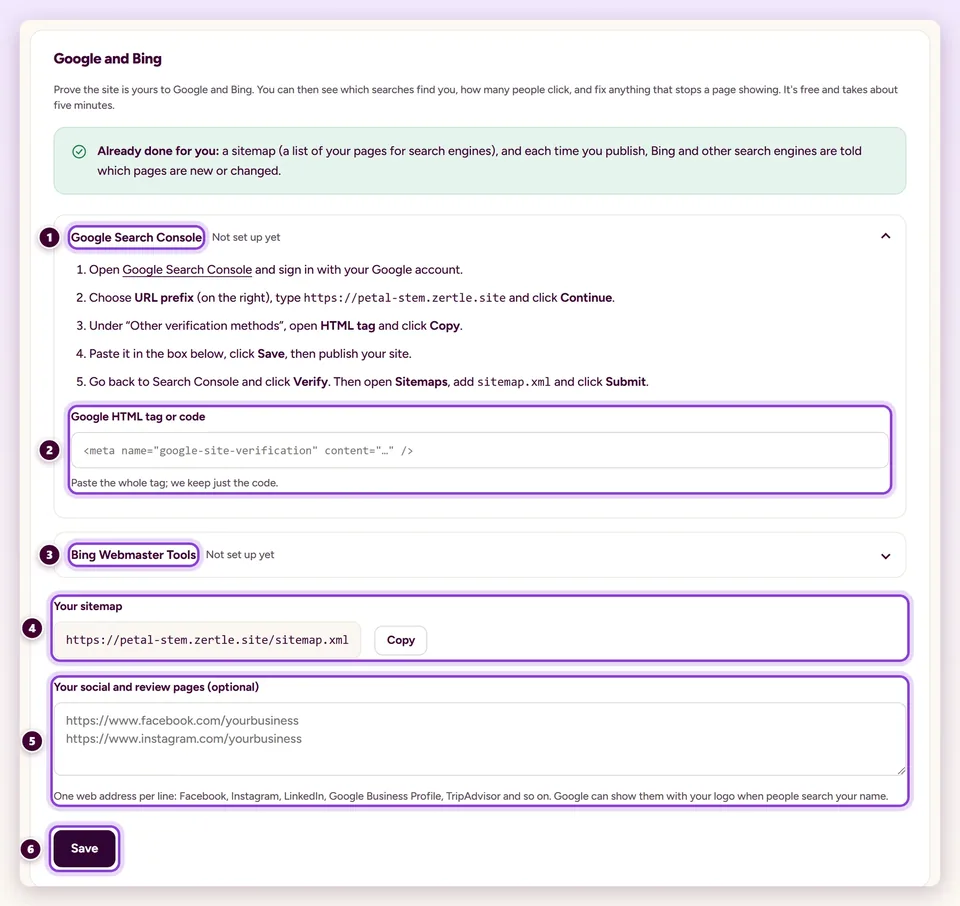
Zertle's Google and Bing settings with step-by-step instructions for Search Console
In Zertle, Settings → Google and Bing walks you through it, one step at a time.
  1. Open Google Search Console and choose Start now.
  2. Choose URL prefix and type your website address exactly, starting with https://.
  3. Choose the HTML tag method and copy the tag Google gives you.
  4. Paste it into your website builder. In Zertle, that's Settings → Google and Bing. Then publish your site.
  5. Back in Search Console, choose Verify.
  6. Open Sitemaps, enter sitemap.xml and choose Submit, so Google finds every page.

Give it a few days, then look at the Performance report. You'll see the exact words people typed to find you, which is gold for knowing what to write about next.

Don't forget Bing and Apple Maps

Google is the biggest, but not the only search engine. Bing also powers search in Microsoft Edge, Yahoo and DuckDuckGo, and many iPhone users find places through Apple Maps.

  • Bing Webmaster Tools: once your site is verified in Google Search Console, you can import it into Bing Webmaster Tools in a couple of clicks.
  • Bing Places: import your Google Business Profile into Bing Places for Business so you appear in Bing Maps too.
  • Apple Business Connect: claim your place on Apple Maps at Apple Business Connect.

Zertle sites also tell Bing and other search engines about new and changed pages every time you publish, so updates appear there quickly.

How long does it take to show up on Google?

A new Business Profile can appear within days of being verified. A new website usually starts appearing within a few days to a few weeks. Ranking near the top for competitive searches takes longer, often a few months of steady effort.

You can speed things up by submitting your sitemap in Search Console, linking to your website from your Business Profile and social media pages, and asking customers for reviews.

Small habits that keep you climbing

  • Ask every happy customer for a review. A steady trickle of fresh reviews helps more than a burst once a year.
  • Add new photos every month, to your website and your Business Profile.
  • Write helpful pages or articles that answer the questions customers ask you every week.
  • Keep your hours up to date, especially around holidays, so nobody turns up to a locked door.
  • Check Search Console once a month to see which searches are growing and which pages need a better title.

Frequently asked questions

Is it really free to get my business on Google?

Yes. A Google Business Profile, Google Search Console and appearing in normal search results are all free. Google Ads are a separate, paid option you don't need to get started.

Can I get on Google Maps without a shop or office?

Yes. If you visit customers, set up your Business Profile as a service-area business. You list the areas you cover, and your home address stays hidden.

Do I need a website if I have a Google Business Profile?

A profile gets you on the map, but a website is where people decide to choose you. It's also where you can show your full range of services, prices, photos and reviews, and take bookings or orders.

Get started today

Set aside an afternoon: create your Business Profile, tidy up your website's titles and headings, and connect Search Console. If you don't have a website yet, you can build one free with Zertle and have it live the same day.

  • SEO
  • Google
  • Small business

BUILD IT WITH ZERTLE

Ready to make your own website?

Pick a template, drag and drop your words and photos into place, and publish. It's free to start.
DRAG. DROP. DONE.

Build your website the easy way

Move and change anything with Zertle's drag-and-drop editor. Phone layouts, hosting and SEO tools included, free to start.
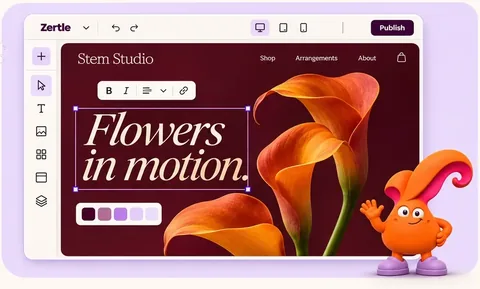
The Zertle drag-and-drop editor with a heading being edited

KEEP EXPLORING

More ways to build a better website

  • Browse templates

    Designs for restaurants, trades, salons, shops, clubs and more.

  • Help centre

    Illustrated, step-by-step guides to every part of Zertle.

  • All features

    Bookings, shops, blogs, forms and everything else you can add.