Features
Everything you need to build, run and grow your website.
Zertle is a drag-and-drop website builder with the tools businesses actually use built in: forms and an enquiry inbox, an online shop, bookings, food ordering, donations, listings, a blog, analytics and Zelly, an AI assistant. Hosting, speed and the technical search basics are handled for you.
- 60+elements to build with
- 0%Zertle transaction fees
- Freehosting and SSL on every plan
- Everytemplate on every plan
All of Zertle at a glance.
- Drag-and-drop editorDesign every page on a visual canvas.
- Phone and tablet layoutsA layout made for every screen.
- Brand, colours and fontsSet your brand once. Use it everywhere.
- Templates and getting startedStart from a design made for your kind of business.
- Zelly, the AI assistantAn AI assistant that helps, then hands you the pen.
- 60+ elementsEvery building block a modern website needs.
- Forms and enquiriesForms that bring in work, and an inbox to manage it.
- Online shopA complete online shop with 0% Zertle fees.
- Online bookingLet customers book real free times, day or night.
- Online food orderingTake pick-up and delivery orders from your own menu.
- Donations and fundraisingOne-off and monthly donations, with goals that inspire.
- Listing websitesProperty, jobs, directories, marketplaces, vehicles and events.
- Blog and collectionsA blog, news, projects or anything you publish often.
- Search, speed and publishingPublish knowing it's fast, findable and right.
- AnalyticsSee what visits turn into.
- Domains, hosting and securityYour own address, secure hosting and nothing to maintain.
- Team, media and accountWork together, keep your photos organised.
Drag-and-drop editor
Design every page on a visual canvas.
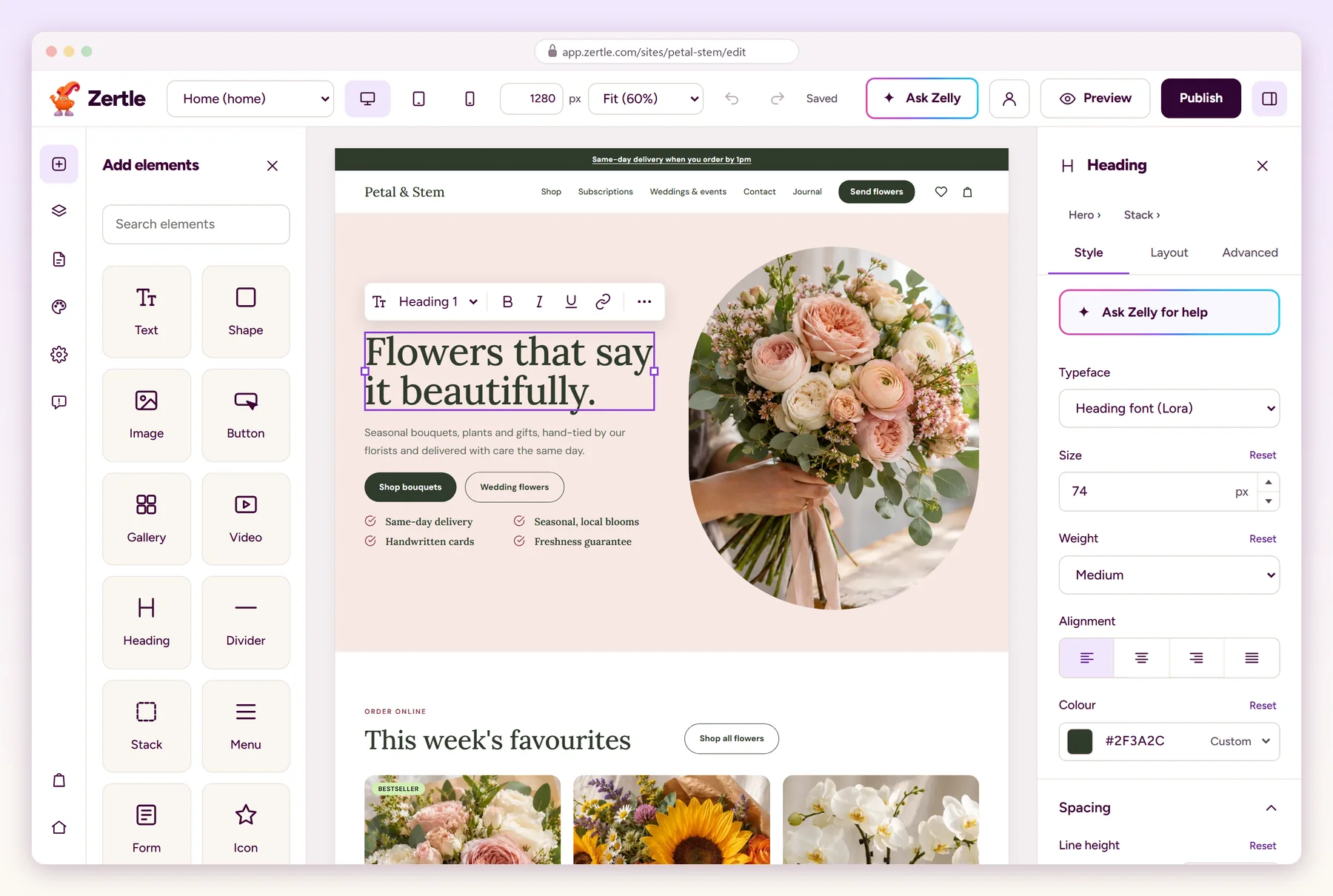
Click to type straight onto the page, drag anything to a new spot and see exactly what visitors will see. Zertle's editor gives you the freedom of a design tool with guard rails that keep pages tidy, fast and readable.
Included on Every plan, including Free
Type and drag on the page
Edit text where it sits, with a floating toolbar for heading levels, bold, italic, links and lists. Drag elements anywhere: a purple line shows where they'll land, even inside other sections.
Three kinds of section
Stacked sections flow down the page, free sections let you place and overlap things exactly, and grid sections line cards up in equal columns.
Style every detail
Typeface, size, weight, line height, letter spacing, colours and gradients, backgrounds, corner rounding, borders, shadows, inner padding, opacity and fades.
Movement and effects
Animate things as they scroll into view (fade, zoom or slide), add hover effects like lift, grow, shadow or photo zoom, or let stickers float gently.
Layers and shortcuts
See the page as a tidy list to select, rename, hide, fold and reorder. Copy and paste between pages, duplicate, group into stacks and nudge with the keyboard.
Undo anything
Undo and redo every change. On Starter and above, save named versions of your design and restore any of them, and put an earlier publish back live.
Style several at once
Select a group of elements and change their colour, font or spacing together.
Accessible by default
Real headings, alt text for photos, accessible names for buttons and links, readable contrast checks and keyboard-friendly menus, forms and tabs.
Custom CSS, never required
Advanced users can add CSS to a single element and set screen-size overrides, anchors and actions. Every feature works without code.
Step-by-step guides: A tour of the editorSelect, edit and move thingsStyle settingsSections, columns and layoutKeyboard shortcuts
Phone and tablet layouts
A layout made for every screen.
Most visits happen on phones, so Zertle gives the phone and tablet layouts their own settings. Switch screen size in the top bar and adjust sizes, spacing, columns and order without touching your desktop design.
Included on Every plan, including Free
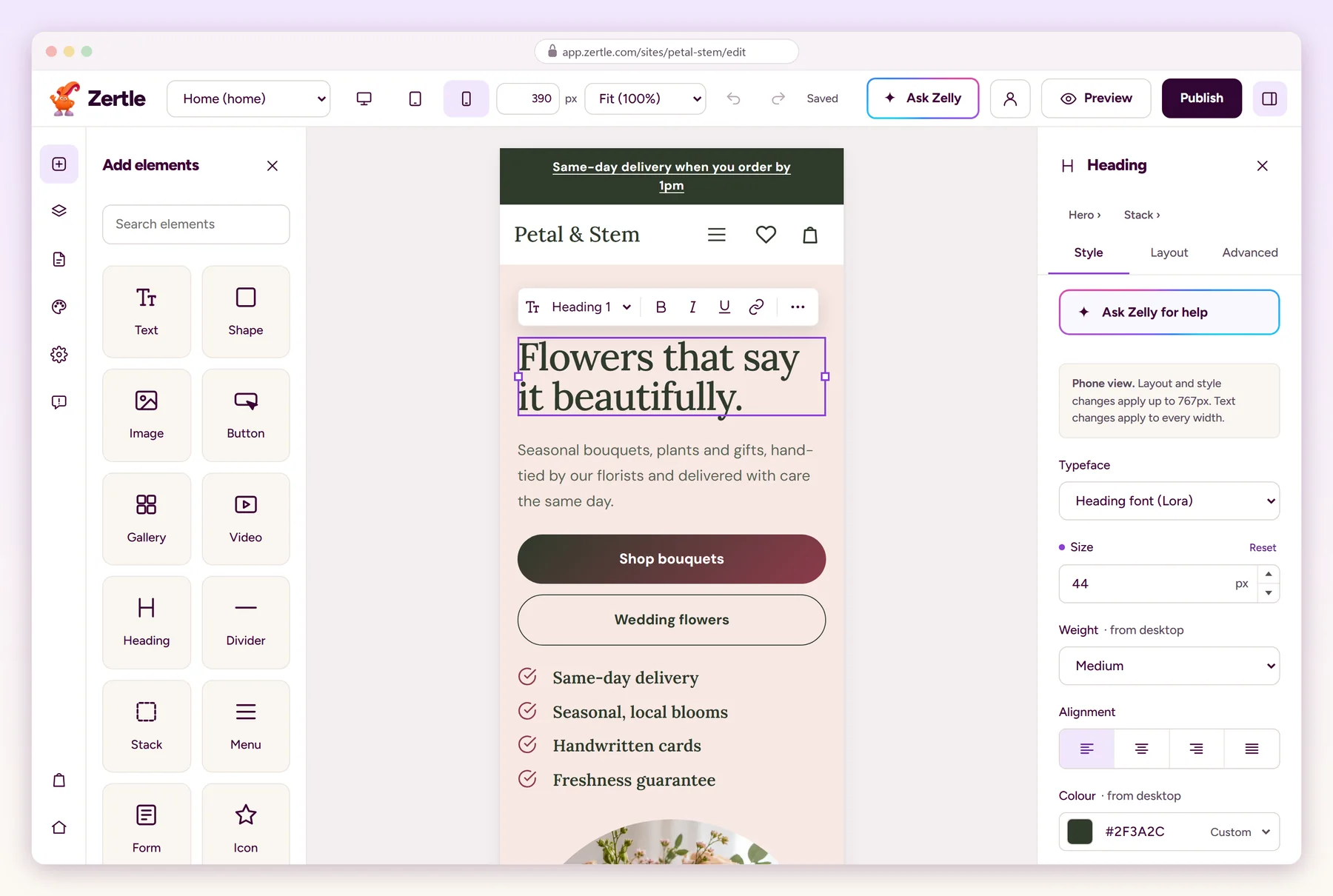
Separate phone and tablet settings
Columns, gaps, text sizes, padding and alignment can each be set per screen size, so phones get a layout designed for them rather than a squashed desktop.
Hide or show per screen
Hide an element on phones, tablets or desktops with one click, like a long photo strip on phones or a phone-only call button.
Phone menus that just work
Menus fold into a tidy phone menu automatically, with drop-downs and mega menus included.
Shop and booking forms built for thumbs
A sticky Add to cart bar appears on phones once the buy box scrolls away, and booking forms show a swipeable strip of days.
Check every page
Preview any page at phone, tablet and desktop widths before publishing, and the publish check flags cramped spacing and hard-to-read text.
Fast on mobile data
Photos are resized for each screen and served as small WebP files, and anything below the fold loads only when it's needed.
Step-by-step guides: Make it look great on phones and tabletsLayout settings
Brand, colours and fonts
Set your brand once. Use it everywhere.
Choose your colours, heading and body fonts, corner rounding and page width in Design. Every element that uses them updates together, so your whole site stays consistent and a rebrand takes minutes.
Included on Every plan, including Free
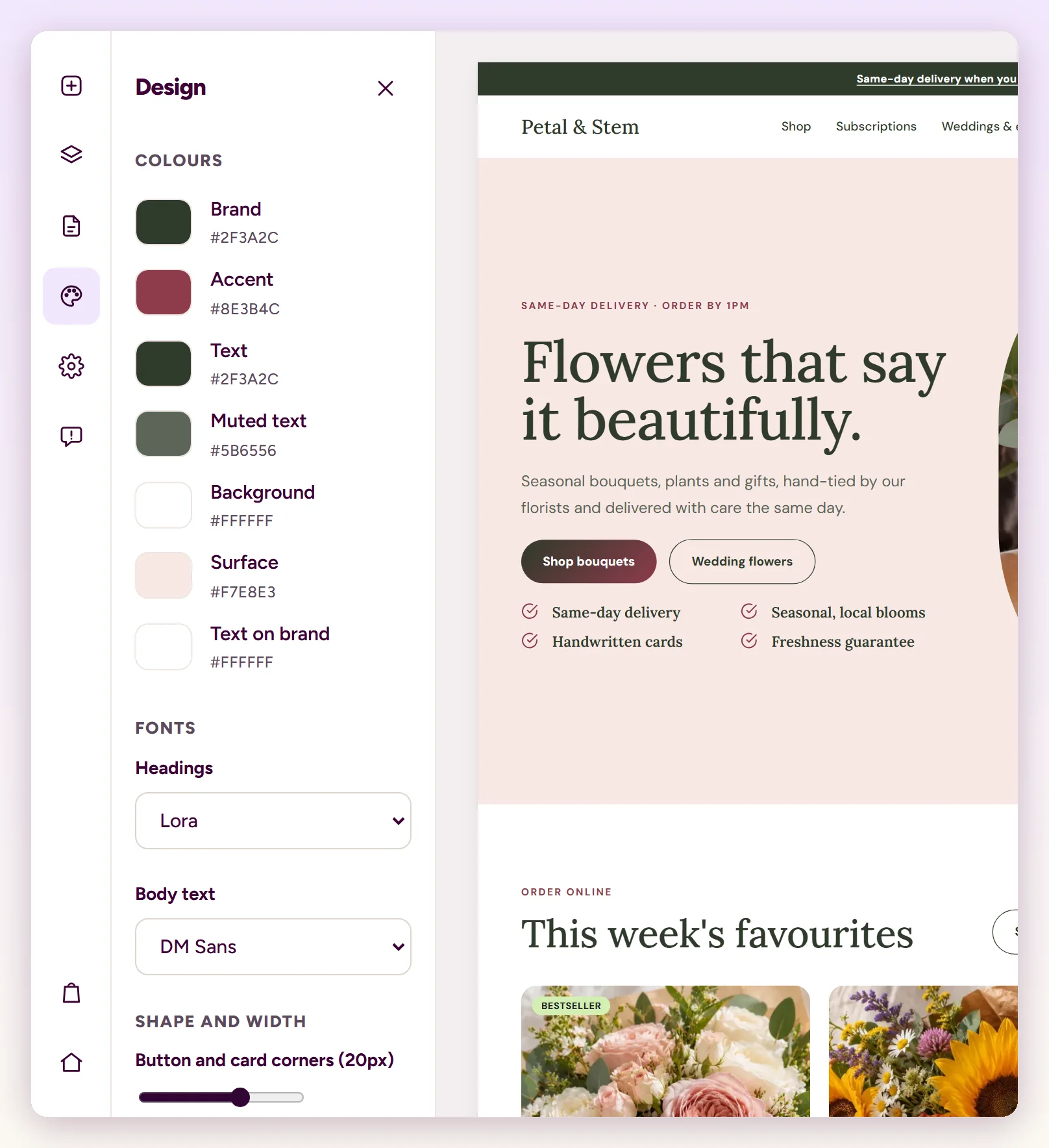
Theme colours
Brand, Accent, Text, Muted, Background, Surface and On brand. Any element can use them, or any custom colour, and the editor lists colours already used on your site.
Gradients
Gradients in your own colours and direction for backgrounds, buttons and even text.
Fonts for every style
A large library of Google Fonts for headings, body text and accents, stored and served from your own site so pages stay fast and private.
Site-wide extras
An announcement bar, a header info strip with contact details, a floating contact button, a back-to-top button and a cookie banner, each set once for every page.
Headers, footers and popups
Sticky headers, headers and footers shared by every page, and popups opened from any button.
Shaped section edges
Wave, curve, tilt, torn, zigzag and scallop edges between sections, in any height and colour.
Step-by-step guides: Colours, fonts and your brandSite-wide settings and local searchAnnouncement bar and floating button
Templates and getting started
Start from a design made for your kind of business.
Every template is included on every plan. Each one is built by hand against Zertle's design standard (spacing, type, colour, phone layouts and speed all have to pass) and comes with real pages you can change completely.
Included on Every plan, including Free
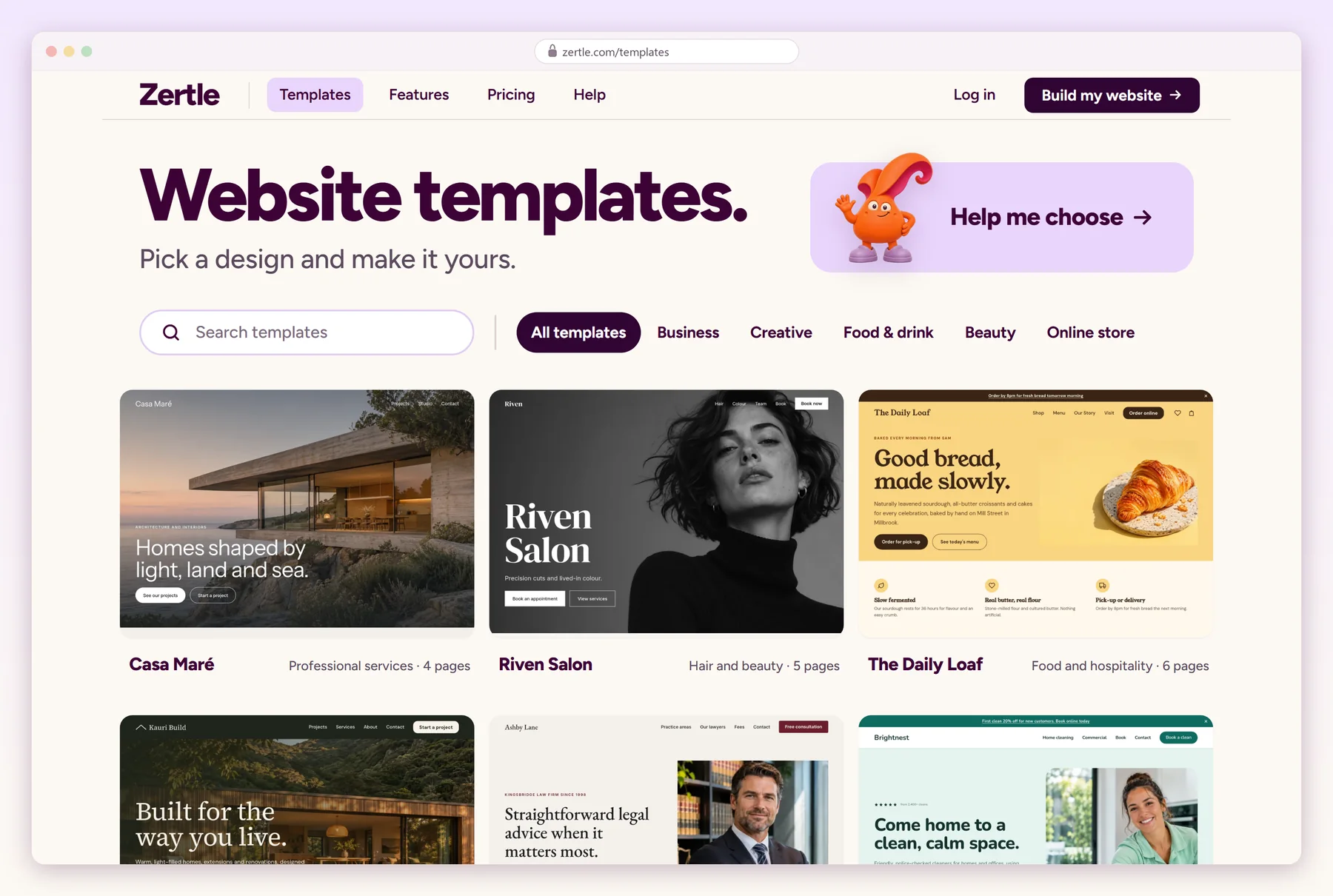
Templates for real businesses
Builders, salons, cafés and bakeries, florists and shops, architects, law firms, cleaners, real estate agents, job boards, car dealers and more, each with the pages that business needs.
Start with AI
Answer a few questions and Zelly writes a first draft of your pages with your details. Check the short brief first, then edit everything.
Or start blank
A clean page with your brand colours and fonts, ready to design from scratch.
Ready-made sections
Add designed sections for heroes, services, testimonials, pricing, FAQs, galleries and contact, then change every detail.
Bring your content
Import blog posts from WordPress or a spreadsheet, products from a spreadsheet, and keep old links working with redirects.
Free stock photos
Search a library of free stock photos from the media picker, or upload your own.
Step-by-step guides: Create your websiteMove posts from WordPressBack up, import and export
Zelly, the AI assistant
An AI assistant that helps, then hands you the pen.
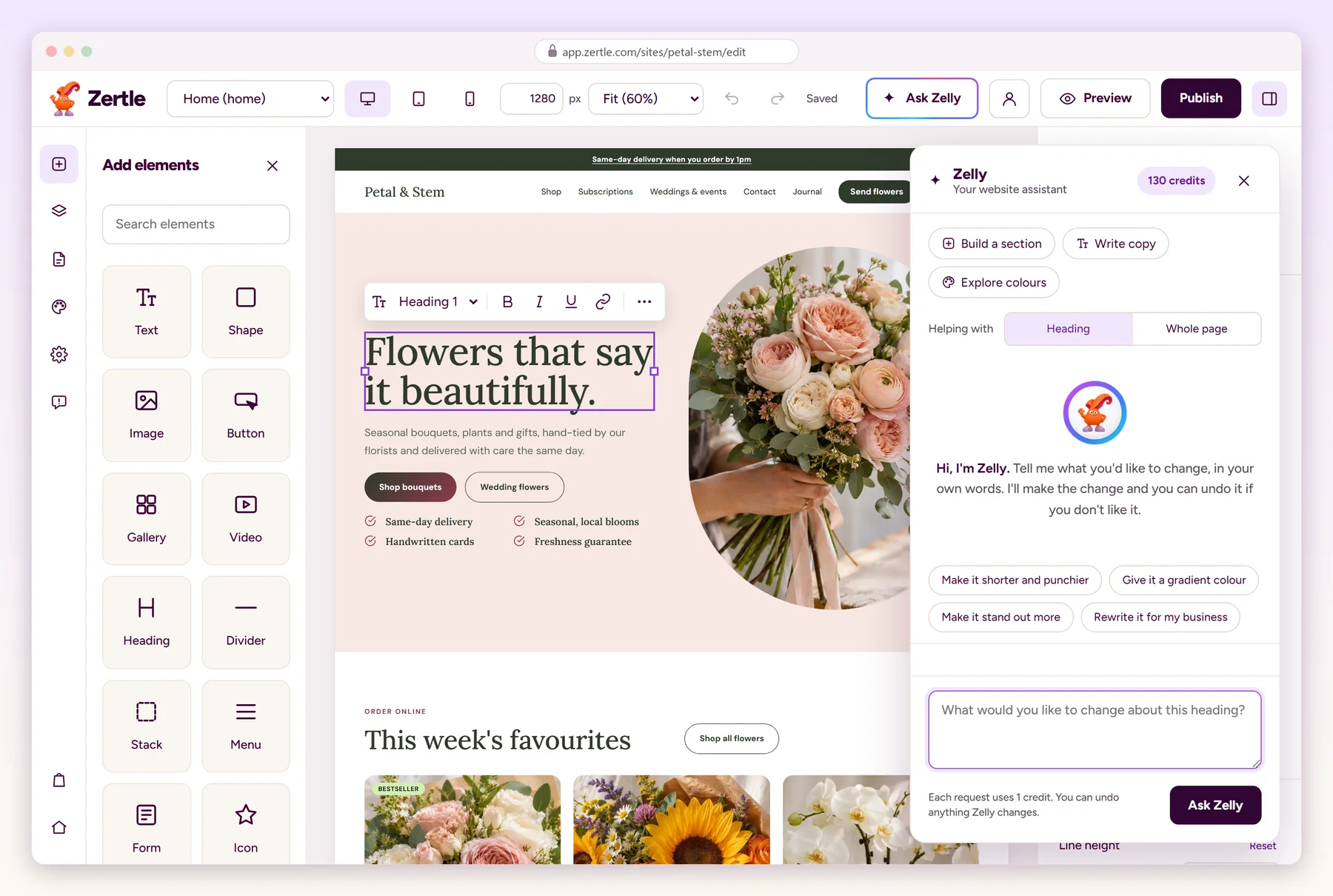
Zelly is built into the editor. Ask in your own words and it rewrites text, restyles sections, fixes phone layouts or builds a whole new section for your business. Each change is one step, so a single Undo puts it back.
Included on Every plan: 10 credits to try on Free, then 30, 80, 120 or 400 a month
Write and rewrite
“Make this heading shorter”, “Write a friendlier welcome”, “Fix the spelling on this page”. Zelly writes for your business from what you've told it.
Restyle in plain words
“Make this section look more premium”, “Give the button a gradient”, “Use warmer colours”.
Build whole sections
Describe what you need and Zelly adds a finished section, written and designed to match your site.
Get found
Zelly writes search titles, search descriptions and photo descriptions, and the publish check offers it for pages that need them.
Checked before it's applied
Every change passes Zertle's design guard: no cramped spacing, unreadable colours or broken phone layouts.
Honest by design
Zelly uses only the facts you give it. It never invents reviews, awards, prices or qualifications, and your contact details are added by Zertle, never sent to the AI.
Credits
- One credit is one request, whatever its size
- Free: 10 credits to try
- Starter: 30 a month
- Business: 80 a month
- Store: 120 a month
- Elite: 400 a month
- 50 extra credits for US$5, never expire
- 150 extra credits for US$12, never expire
- 400 extra credits for US$29, never expire
Step-by-step guides: Zelly, your assistant
60+ elements
Every building block a modern website needs.
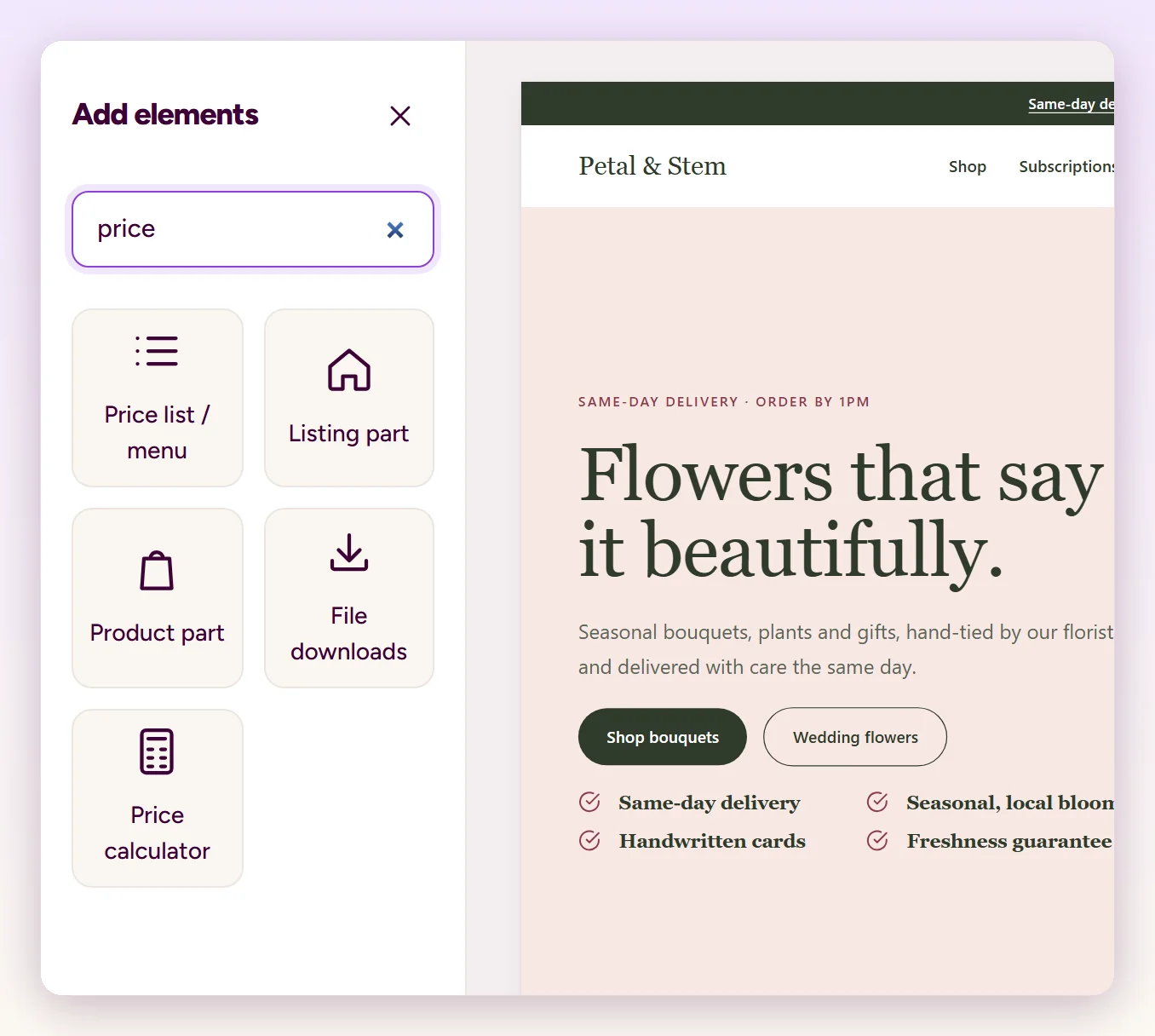
Find any element by name or by what it does in the Add panel, then click or drag it onto the page. Each one looks finished the moment it's added, and every visible part has its own settings for desktop, tablet and phone.
Included on Most on every plan; galleries on Starter and above; shop, booking, listings and other business elements on the plans below
Galleries and slideshows
Albums as grids, masonry or sliding rows with a full-screen viewer, hero slideshows, and before-and-after photos with a drag handle.
Video
Upload a video or link YouTube or Vimeo, with a cover photo, play button styles and pop-up playback, plus background videos for sections and stacks.
Menus and logos
Drop-down and mega menus, custom menu items, buttons in the menu and a phone menu, all keyboard accessible.
Cards that sell
Service cards, testimonials and team members as grids or sliding rows, with filter buttons.
Prices and proof
Price lists and menus, pricing plans, counting stats, process steps, icon features, star ratings and logo strips.
Tools for visitors
An instant price calculator, a weekly class timetable, file downloads for menus and brochures, countdowns and a site search bar.
Personality
Sticker badges, scrolling text, accent fonts, photo frames and shapes.
Contact and maps
A map beside your address, phone, email and opening hours, plus a floating contact button.
Embeds
Add a widget from another service, like a Google Form, a Spotify player or a third-party calendar, with privacy-friendly loading.
All elements
- Text
- Heading
- Button
- Image
- Shape
- Icon
- Divider
- Spacer
- Stack
- Menu and logo
- Form
- Map
- Contact details
- Gallery
- Slideshow
- Before & after
- Video
- Accordion (FAQ)
- Tabs
- Service cards
- Testimonials
- Team
- Hero slider
- Flexi hero
- Promo card
- Logo strip
- Instagram grid
- Price list / menu
- Stats
- Process steps
- Pricing plans
- Icon features
- Category tiles
- Countdown
- Star rating
- Sticker badge
- Scrolling text
- Payment icons
- Search bar
- Newsletter
- File downloads
- Price calculator
- Class timetable
- Embed
- Announcement bar
- Header info strip
- Floating contact button
- Product grid
- Product part
- Cart & wishlist
- Online ordering
- Online booking
- Donate
- Fundraising goal
- Listings grid
- Listing search
- Listing part
- Blog or collection list
- Post content
- Table of contents
- Related posts
Step-by-step guides: Add elements and sectionsGallery, Slideshow and Before & afterPrice lists, stats, steps and pricing plansPrice calculatorClass timetable
Forms and enquiries
Forms that bring in work, and an inbox to manage it.
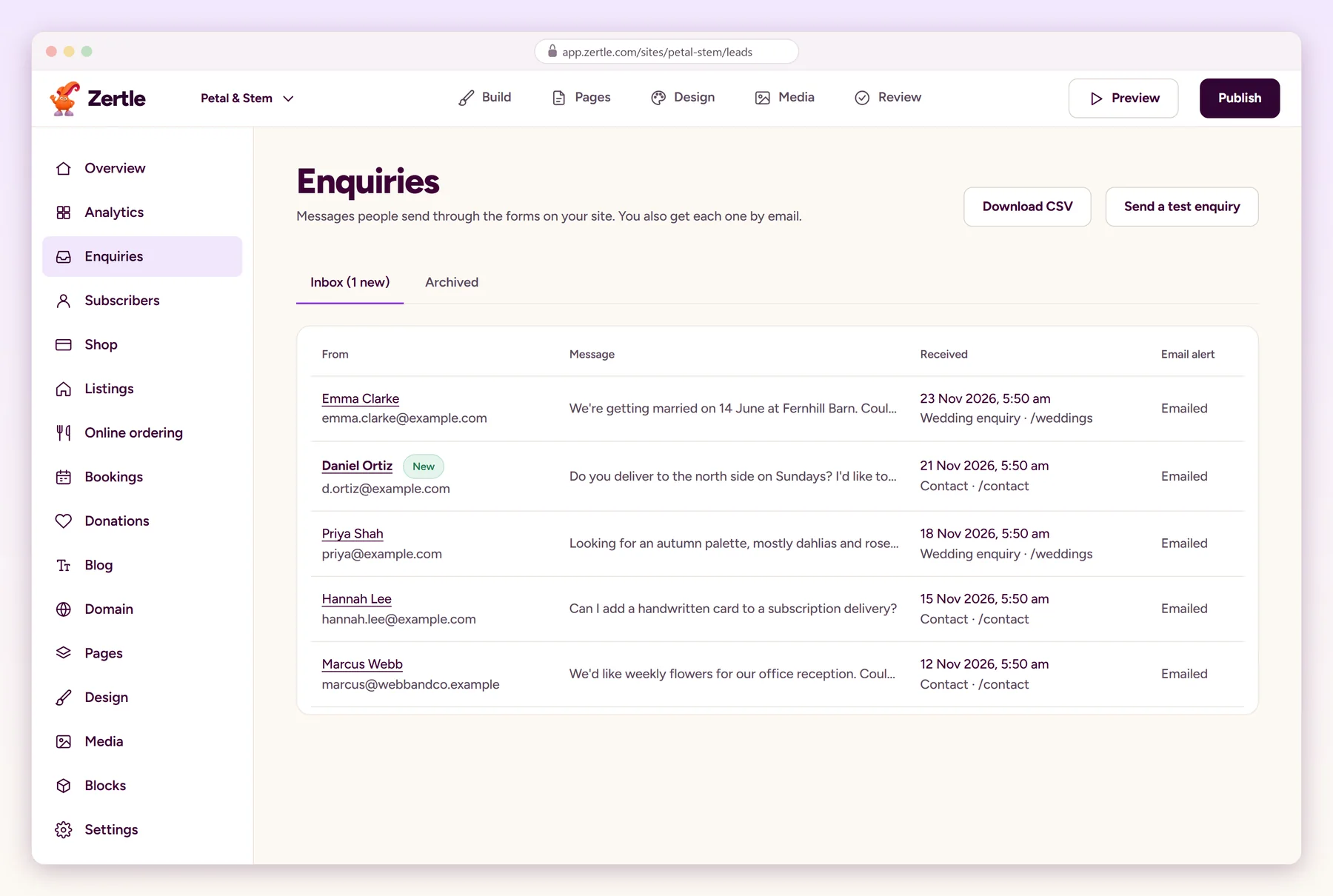
Contact and quote forms send every enquiry to your Zertle inbox and your email, with spam protection built in. Reply straight from your email, then label, assign and keep notes on each enquiry with your team.
Included on Contact form on every plan; custom and multi-step forms on Business and above
Any questions you need
Short and long answers, numbers, email, phone, web addresses, drop-downs, choose one, tick boxes, dates, times, agreement boxes and file uploads, each required or optional.
Steps and smart questions
Split long forms into steps with a progress bar, and show questions only when they apply, like “Upload your plans” for a new build.
File uploads, safely
Photos and documents up to 10 MB each and 20 MB per enquiry. Every file is checked by its contents, kept private and deleted automatically after 12 months unless you choose to keep it.
Spam protection
Hidden trap fields, timing checks and sending limits stop bots without puzzles for your visitors.
Email alerts and automatic replies
Alerts go to the addresses you choose, with the visitor as the reply-to. Send visitors an automatic thank-you in your own words.
An inbox for your team
Labels, assigning (with an email to the person), private notes, archive, filters and a CSV download. Send a test enquiry any time.
Newsletter sign-ups
Collect subscribers with an optional first name and discount code, then download the list for Mailchimp, Brevo or any email tool.
Email campaigns
Write a newsletter with a photo, button and featured products, send yourself a test, then send it now or schedule it. One-click unsubscribe is built in. 2,500 emails a month on Business, 10,000 on Store, 25,000 on Elite.
Email automations
Elite: a welcome for new subscribers, a thank-you after each purchase and a we-miss-you for customers who haven't ordered for a while. Write them once and they send themselves, with your own timing and discount code.
Step-by-step guides: FormEnquiries inboxNewsletter sign-upSubscribers
Online shop
A complete online shop with 0% Zertle fees.
Add products, design your shop to match your brand and take card payments, Apple Pay and Google Pay straight into your own Stripe account. Zertle never takes a cut of your sales; only Stripe's card fees apply.
Included on Up to 25 products with cart, checkout, digital downloads, gift cards and abandoned-cart emails on Business; up to 500 products with discount codes, shipping zones, per-option stock, subscriptions and sales reports on Store; up to 25,000 products, shoppers' own currencies and Xero or QuickBooks on Elite
Products with everything
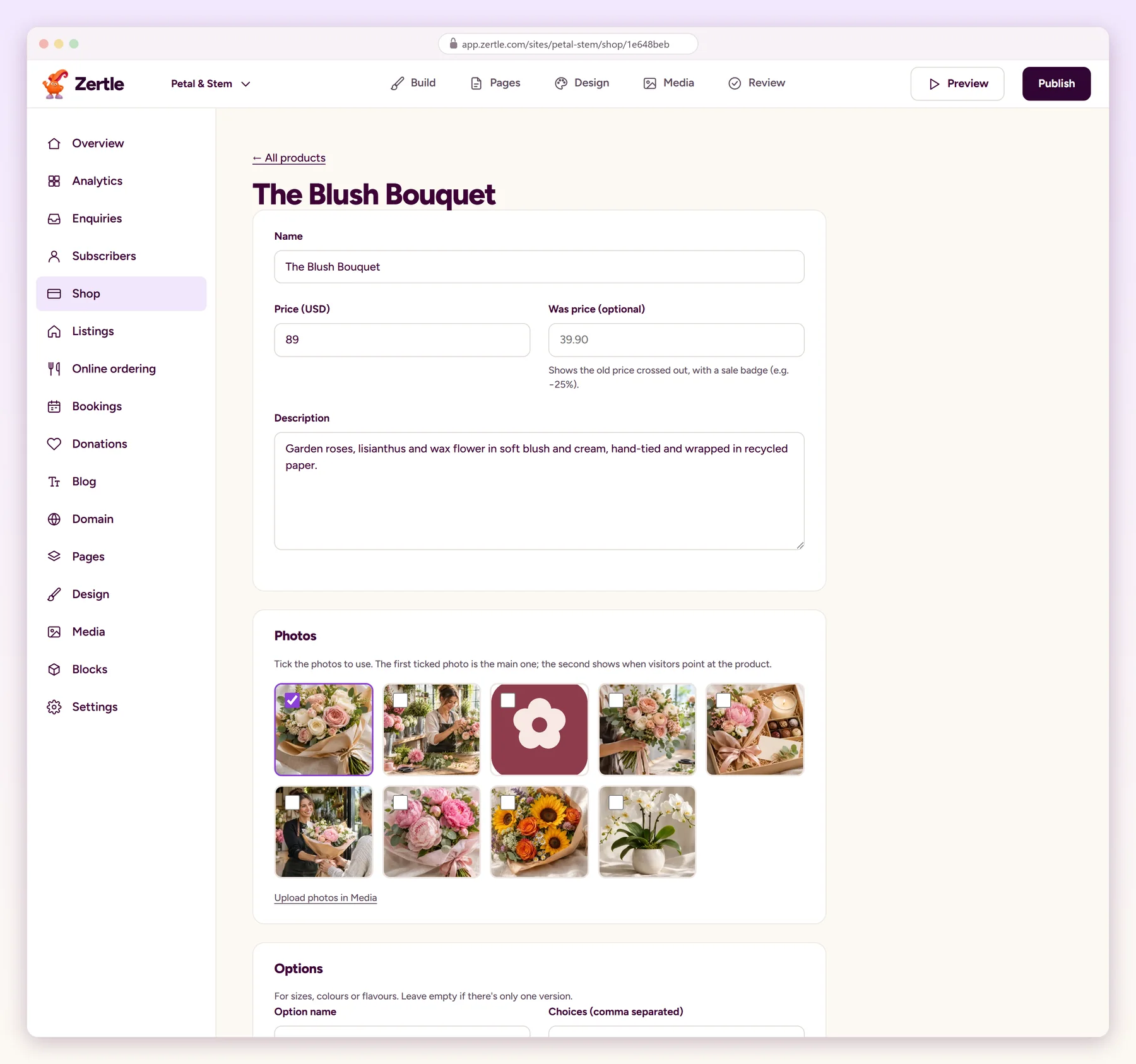
Prices and was prices with sale badges, a “Sale ends in…” countdown, photo galleries, extra details, stock with sold-out states, badges and collections.
Options and swatches
Sizes, colours and flavours as drop-downs, buttons, or colour and photo swatches, with size guides you write once and reuse.
Product grids anywhere
Show all products or one collection with filter tabs, sorting, columns per screen size, quick view, wishlist and compare.
Design your product page
One product page design for every product, built from parts you can move and style: photos, buy box, stock level, delivery lines, reviews, related products and more.
Checkout and payments
Card payments, Apple Pay and Google Pay through Stripe, bank transfer, a free-shipping progress bar and pick-up.
Shipping to every country
Zones for any mix of the world's countries and territories (type groups like European Union), each with as many delivery options as you like: Standard, Express, Local delivery and more.
Flexible delivery pricing
One price per order, a price per item, or bands by order total or weight, with free-shipping amounts, delivery times, order limits and postcode areas for local delivery. Customers pick their option at checkout.
Prices and stock for each option
Give every size and colour combination its own price, stock, SKU and weight, or stop selling one. The product page updates the price and stock as customers choose.
Products that don't ship
Services, downloads, tickets and gift cards add no shipping, and an order of only those skips the address. Bulky items can add their own extra shipping.
Pick-up locations
Several collection points, each with its address, opening hours, ready time, instructions and an optional fee. Customers choose one at checkout, and you email them when it's ready.
Tracking emails
Add a carrier and tracking number (or several parcels) and the customer gets a "Your order is on its way" email with a tracking link for 15 carriers or any other courier.
Delivery estimates
Product pages can show "Arrives Mon 1 Dec – Thu 4 Dec" for the shopper's country, from your processing time and delivery times.
Sales reports
Sales, orders, average order and items sold over 7, 30 or 90 days, 12 months or any dates you choose, with a sales chart, best-selling products and options, sales by country and a spreadsheet download.
Payment links for deposits
Links for deposits, invoices and booking fees: a set amount or one the customer types, your reference, one-time or reusable, with an end date. Customers pay on your website and get a receipt.
Orders and customers
Every order with its status (new, paid, sent, completed), order emails to you and your customer, customer accounts and a customer list with what each has spent.
Reviews that sell
Collect product reviews, check them first or publish verified buyers' 4 and 5 star reviews automatically, and email customers asking for a review.
Discount codes
Percentage or fixed-amount codes at checkout, with a newsletter sign-up that can hand one out.
Digital downloads
Sell ebooks, music, patterns, courses and photos: files up to 100 MB, private download links after payment, with your choice of how long they work and how many downloads.
Gift cards
Sell gift cards on your website, sent now or on a date with a personal message, or issue them yourself. Customers spend them at checkout and keep any balance.
Abandoned-cart emails
Shoppers who type their email but don't finish get a friendly reminder (and an optional second one) with a link that refills their cart. See what reminders win back.
Shoppers' own currencies
Elite: shoppers see prices in their own currency (chosen from where they are, with a switcher) and pay in it by card. Pick which currencies, and round to .99 or whole numbers.
Xero and QuickBooks (coming soon)
Elite: every paid order goes to Xero as a paid invoice or to QuickBooks as a sales receipt, automatically.
Huge catalogues
Elite: up to 25,000 products and 25,000 listings, with fast search and filters, and every page ready for search engines.
Subscribe and save
Let customers get a product every week, two weeks or month with their own discount. Each delivery is charged automatically and arrives as a new order.
14 currencies
USD, EUR, GBP, AUD, CAD, NZD, SGD, ZAR, CHF, SEK, NOK, DKK, HKD and MXN, plus product and order spreadsheets.
Step-by-step guides: Set up your online shopAdd and edit productsDesign your product pagesShipping zones and shop settingsTake card payments with StripeSell digital downloadsSales reportsPayment linksProduct reviews
Online booking
Let customers book real free times, day or night.
Set your services and hours, add a booking form to any page and customers choose from times that are actually free. Times are checked live, so nothing is double-booked, and bookings you take by phone sit in the same calendar.
Included on Business and above; staff calendars on Store and Elite
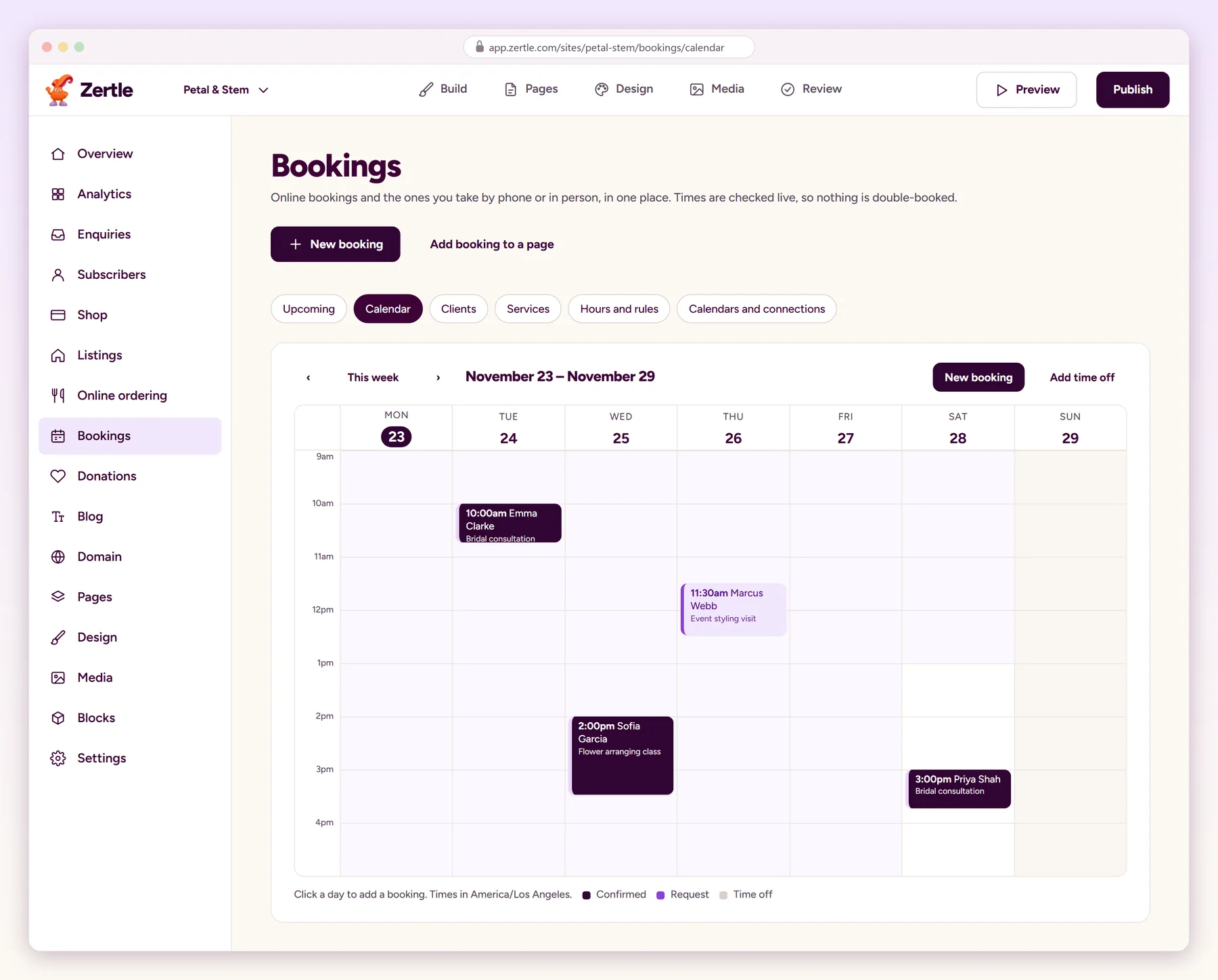
Services your way
From 10 minutes to 8 hours, with prices (or “From” prices), descriptions and group sizes for classes and tours.
Hours and rules
Opening hours with breaks, notice needed, how far ahead people can book, start-time intervals, a break between bookings and how many people you can see at once.
Confirm or approve
Confirm bookings straight away, or accept each request first while the time is held.
Reminders and cancelling
Reminder emails 2 hours, 1 day or 2 days before, and online cancelling up to the cut-off you choose.
Clients and notes
Everyone who's booked, with their history and private notes for your team, searchable and downloadable.
Your calendar, in sync
See bookings in Google, Outlook or Apple Calendar, block times you're already busy, and add a Book button to Google, Instagram and Facebook.
Staff calendars
Store and Elite: customers choose who they book with (or anyone available). Each person has their own services, hours and time off, and gets an email for their bookings.
Already use another system?
Show Calendly, Square Appointments, Acuity, Fresha, SimplyBook.me, Setmore, OpenTable or Resy in the same element instead.
Step-by-step guides: Take bookings onlineServices, hours and rulesManage your bookingsCalendar sync and booking links
Online food ordering
Take pick-up and delivery orders from your own menu.
Cafés, restaurants and takeaways can take orders without marketplace commission. Build your menu, set your ordering hours and run every order from a live kitchen board.
Included on Store plan
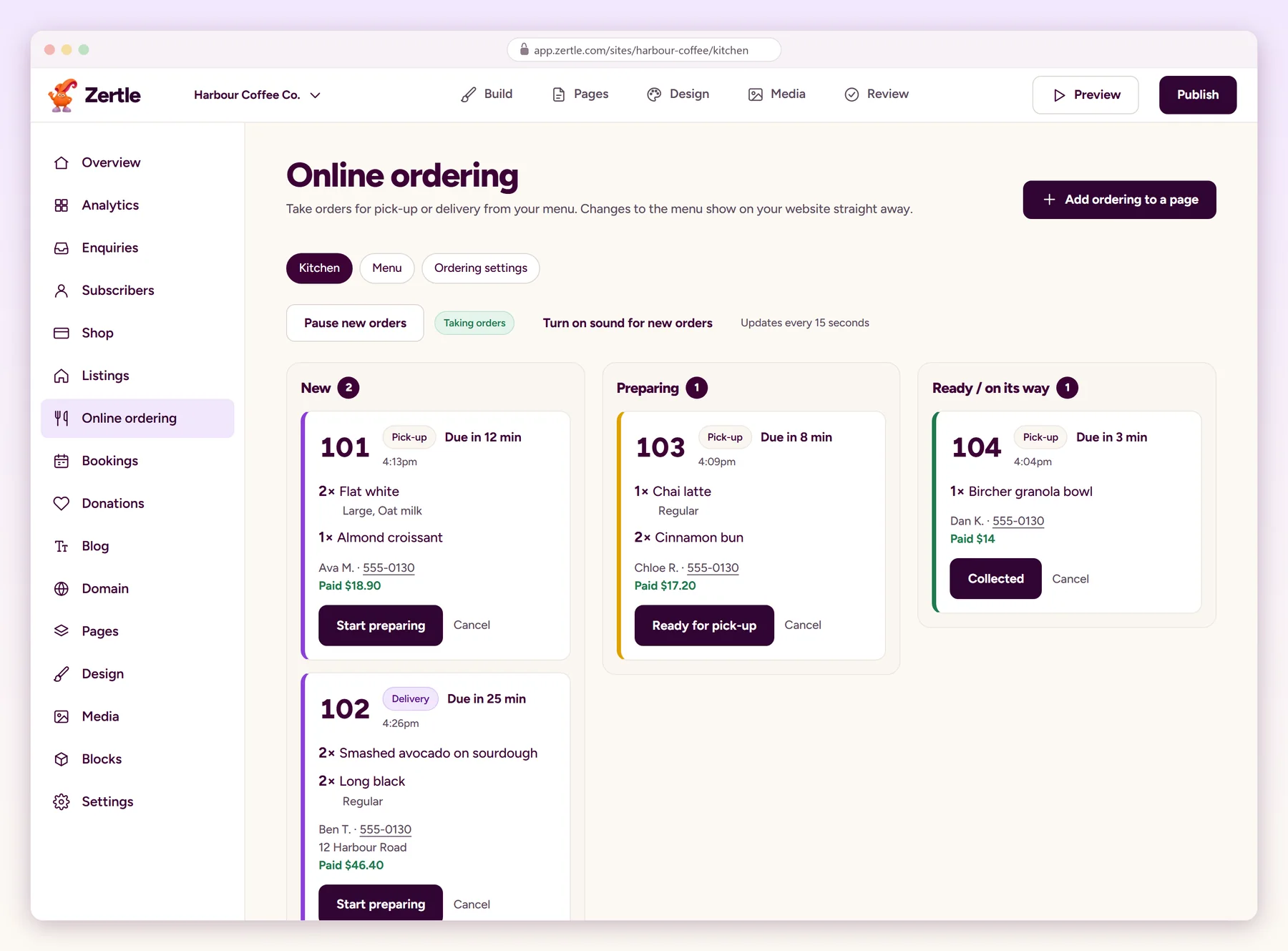
A menu people can order from
Sections, descriptions, prices, photos and dietary labels like vegetarian, vegan, gluten free and spicy.
Choices and extras
Up to six groups per item, like size or milk, each “must choose one”, “can choose one” or “can choose any”, with extra prices.
Ordering hours
Hours per day with a break, closed dates, preparation time, gaps between pick-up times, a limit per time slot, order-ahead days and “as soon as possible”.
Pick-up and delivery
Pick-up with instructions, and delivery with a fee, a minimum order, extra time and the areas you cover.
Pay online or on collection
Card payments go to your own Stripe account, or let customers pay when they collect.
Kitchen board and alerts
New orders appear live on the kitchen board, with order emails and a pause button for busy times.
Step-by-step guides: Online food ordering
Donations and fundraising
One-off and monthly donations, with goals that inspire.
Charities, clubs, schools and community groups can take donations by card on their own website, run campaigns with a goal and show progress as it grows.
Included on Business and above
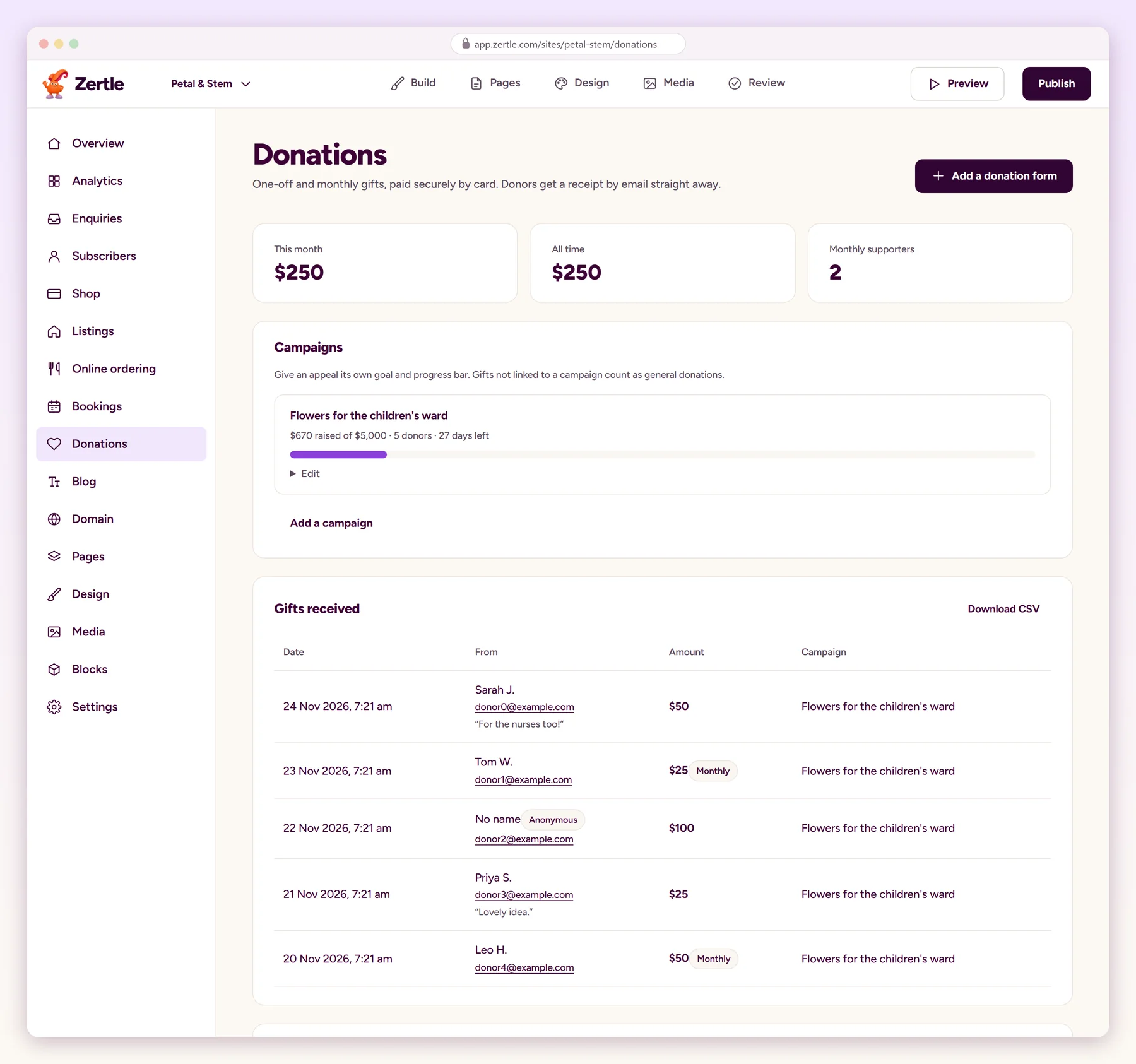
Once or monthly
Offer one-off gifts, monthly giving or both, with monthly gifts renewing automatically.
Amounts with impact
Up to six amounts, each with a note on what it does, plus an “Other amount” box.
Campaigns and goals
Raise money for something specific with a goal, and show the amount raised, donors and days left.
Receipts and records
Donors get a receipt by email, and you see every gift and monthly donor in your dashboard.
Other ways to give
Link to PayPal, GoFundMe, JustGiving, Patreon, Ko-fi and more beside the form.
Step-by-step guides: Accept donations
Listing websites
Property, jobs, directories, marketplaces, vehicles and events.
Run a listing website with search, filters and an enquiry on every listing. Each listing gets its own page, web address, search description and structured data that search engines understand.
Included on Up to 25 listings on Business, 500 on Store and 25,000 on Elite
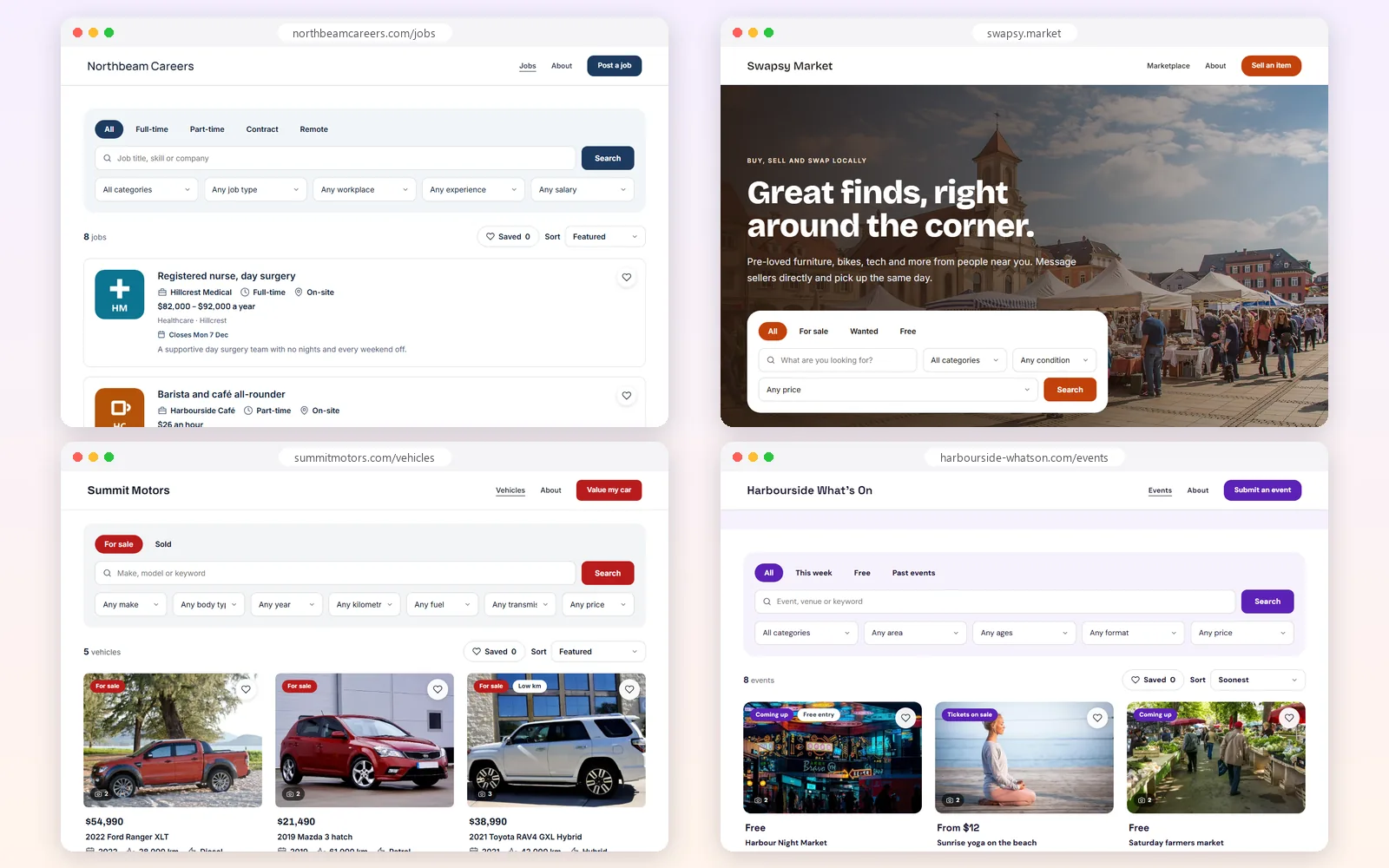
Six kinds of listing
Property (buy, rent and sold), job boards, business directories, marketplaces, vehicles and events, each with the right fields, filters, tabs and statuses.
Search and filters
A listings grid with a filter bar and tabs, plus a search box for your home page that sends visitors to results with their search filled in.
Listing pages you design
One page design for every listing: photo mosaics or sliders, key facts, the story, a details table, a map and an enquiry form.
The people behind them
Agents, recruiters, sellers and organisers with photos and contact details, and enquiries sent to the right person.
Add a listing in minutes
Basics, price, location, key facts, description, photos, dates and open homes from your dashboard.
Step-by-step guides: Listings: get startedListing typesAdd and edit a listingDesign your listing pages
Blog and collections
A blog, news, projects or anything you publish often.
Collections hold posts, projects, case studies or any repeating content. Write in a clean editor, choose a list and post design, and show posts anywhere on your site.
Included on Starter and above
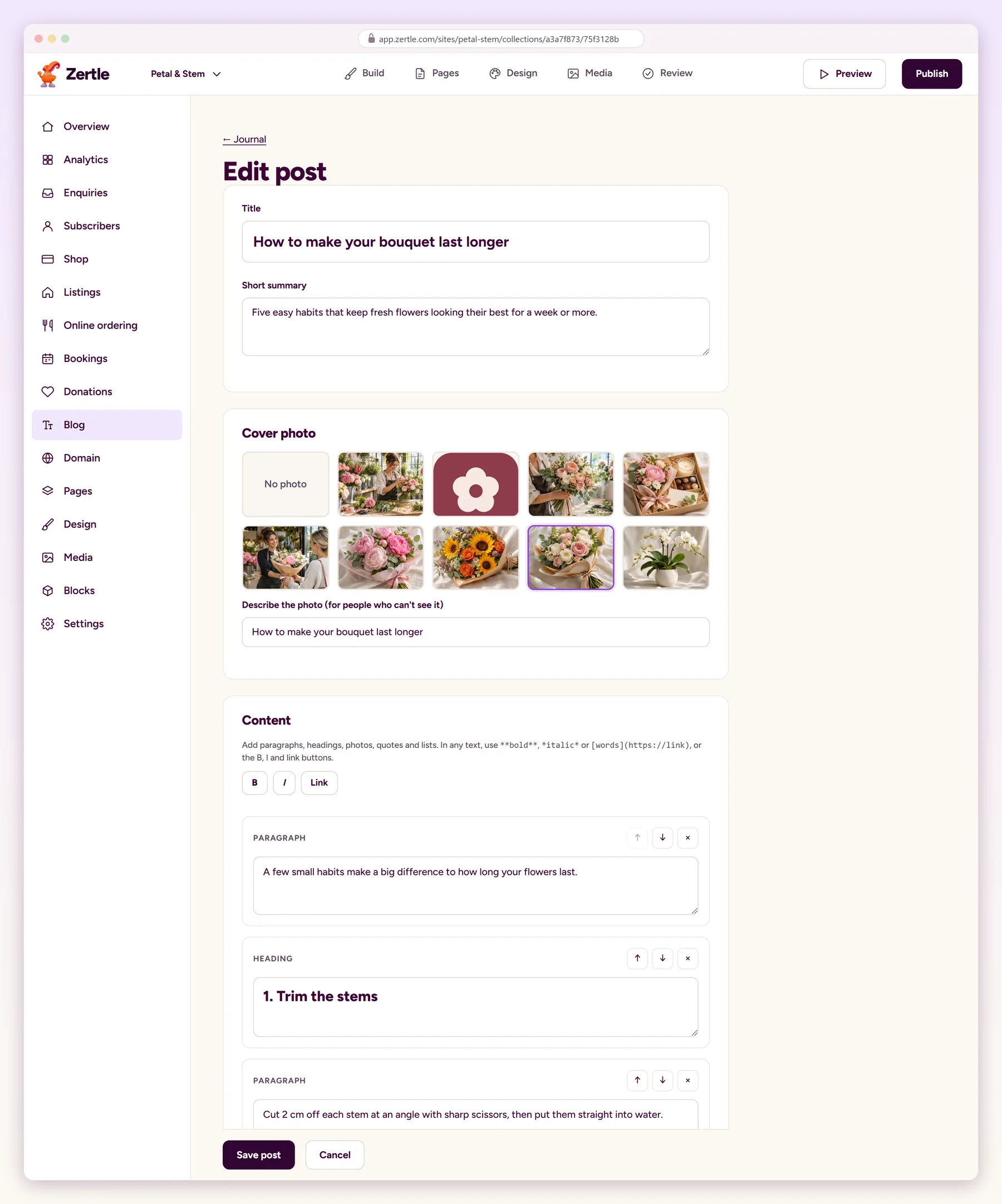
Collections for anything
Name what one item is called (post, project, property) and add extra details every item has.
Five list designs
Journal, Magazine, Minimal, Showcase or a blank canvas, each fully editable.
Posts with everything
Cover photos, summaries, content blocks, categories, tags, authors, featured posts, drafts and each post's own search title, description and address.
Lists on any page
Cards, list, featured, minimal or tiles, with category filter buttons, columns per screen size and your choice of what each item shows.
Post pages that keep readers
A table of contents from your headings, related posts by category and tag, and the cover photo as a section background.
Move from WordPress
Bring your WordPress posts, or a spreadsheet of posts, into Zertle in one go.
Step-by-step guides: Start a blog or collectionWrite and edit postsDesign blog lists and post pages
Search, speed and publishing
Publish knowing it's fast, findable and right.
Zertle handles the technical side of search and speed for you, then checks every page before it goes live. Most fixes take one click, or Zelly can do them for you.
Included on Every plan, including Free
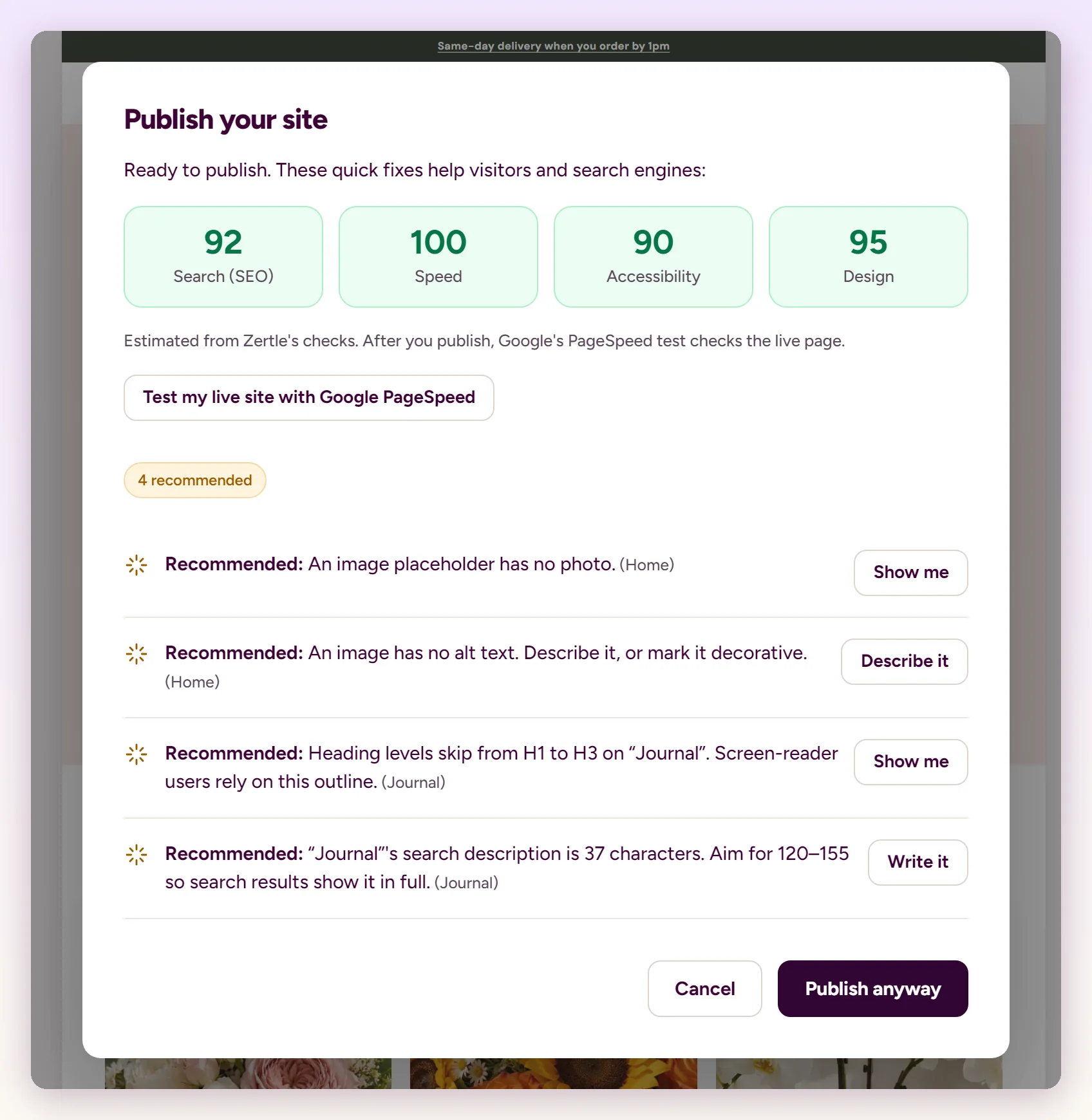
The publish check
Finds missing search titles and descriptions, thin pages, missing photo descriptions, low-contrast text, cramped spacing and slow photos, with one-click fixes.
Scores before you publish
Estimated search, speed and accessibility scores, then Google's own PageSpeed test on your live home page.
Fast by design
Static pages served from a global network, photos resized and converted to WebP for each screen, lazy loading below the fold, self-hosted fonts and no tracking scripts unless you add your own.
Search basics done for you
Clean addresses, a sitemap, links between pages, and structured data for your business, opening hours, products, prices, reviews, listings and posts.
Your part, made easy
Search titles and descriptions for every page, local business details for Google, and one main heading per page, with guidance as you go.
Redirects
Send old links to the right page one at a time or in bulk, as permanent (301) or temporary (302), so you keep your rankings when you move.
Step-by-step guides: Publish your siteGet found on GooglePage settings and searchRedirect old addressesUndo, versions and restoring
Analytics
See what visits turn into.
Your dashboard shows visitors and page views alongside the results that matter: enquiries, orders and sales, bookings, subscribers and donations. It's counted without cookies, so no banner is needed for it.
Included on Every plan
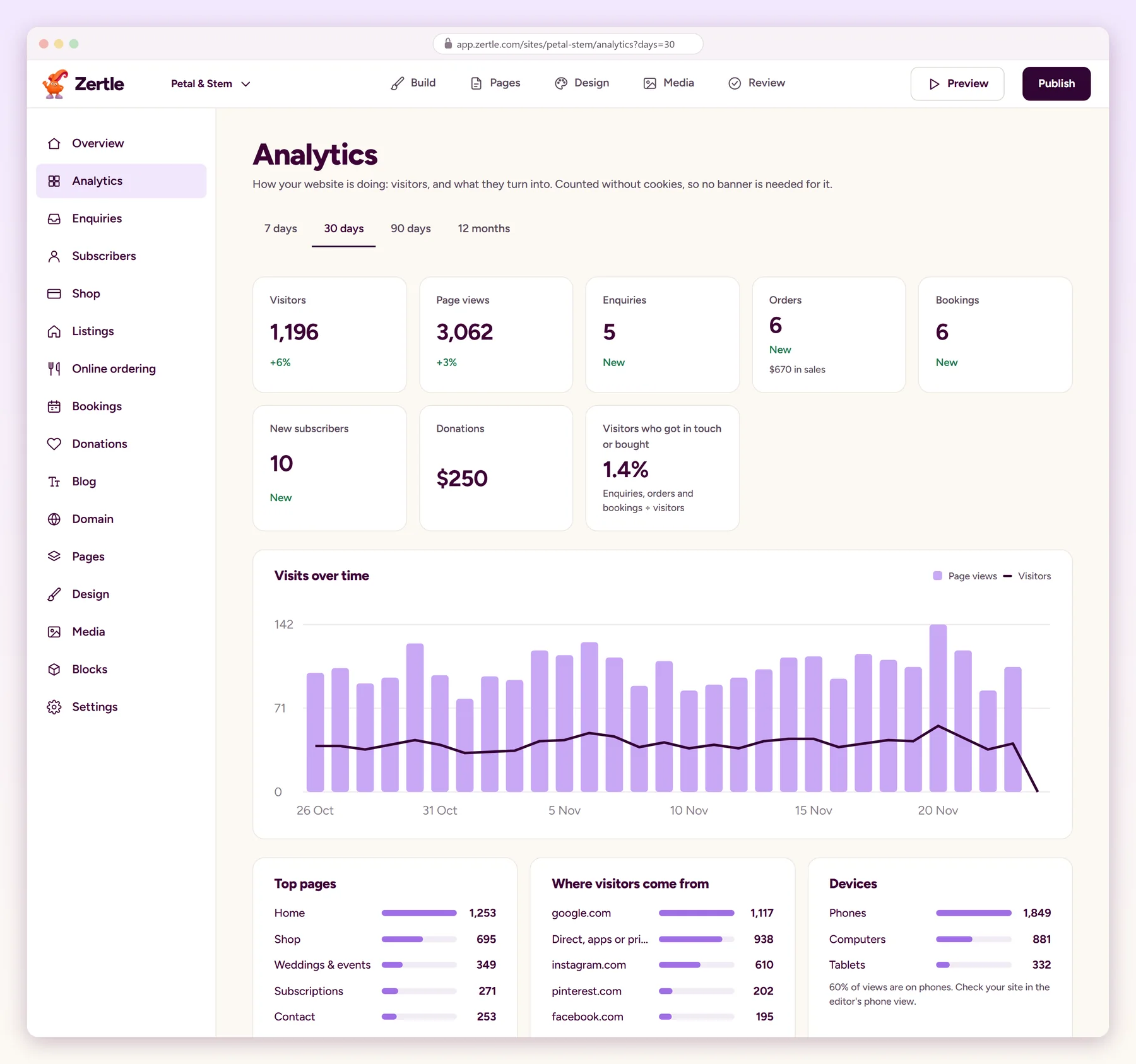
Results, not just visits
Enquiries, orders and sales, bookings, new subscribers, donations and the share of visitors who got in touch or bought.
Any period
The last 7, 30 or 90 days or 12 months, compared with the period before.
Where visitors come from
Top pages, the websites and apps that send visitors, devices and countries.
Privacy-friendly
No cookies and no third-party trackers, so your visitors aren't followed around the web.
Google Analytics, Tag Manager and Meta Pixel
Starter and above: add your IDs and they load after visitors accept cookies when your banner asks first. Purchases are reported to Google and Meta automatically.
Advanced analytics
Elite: your shop funnel from product views to orders, sales by where visits came from, tagged links (utm) and what every email campaign and automation earned.
Step-by-step guides: Analytics: visitors and results
Domains, hosting and security
Your own address, secure hosting and nothing to maintain.
Every site gets a free zertle.site address, hosting on a global network and a secure padlock. Connect a domain you already own or buy a new one, and Zertle handles the rest: no servers, plugins or updates.
Included on Hosting and SSL on every plan; your own domain on Starter and above
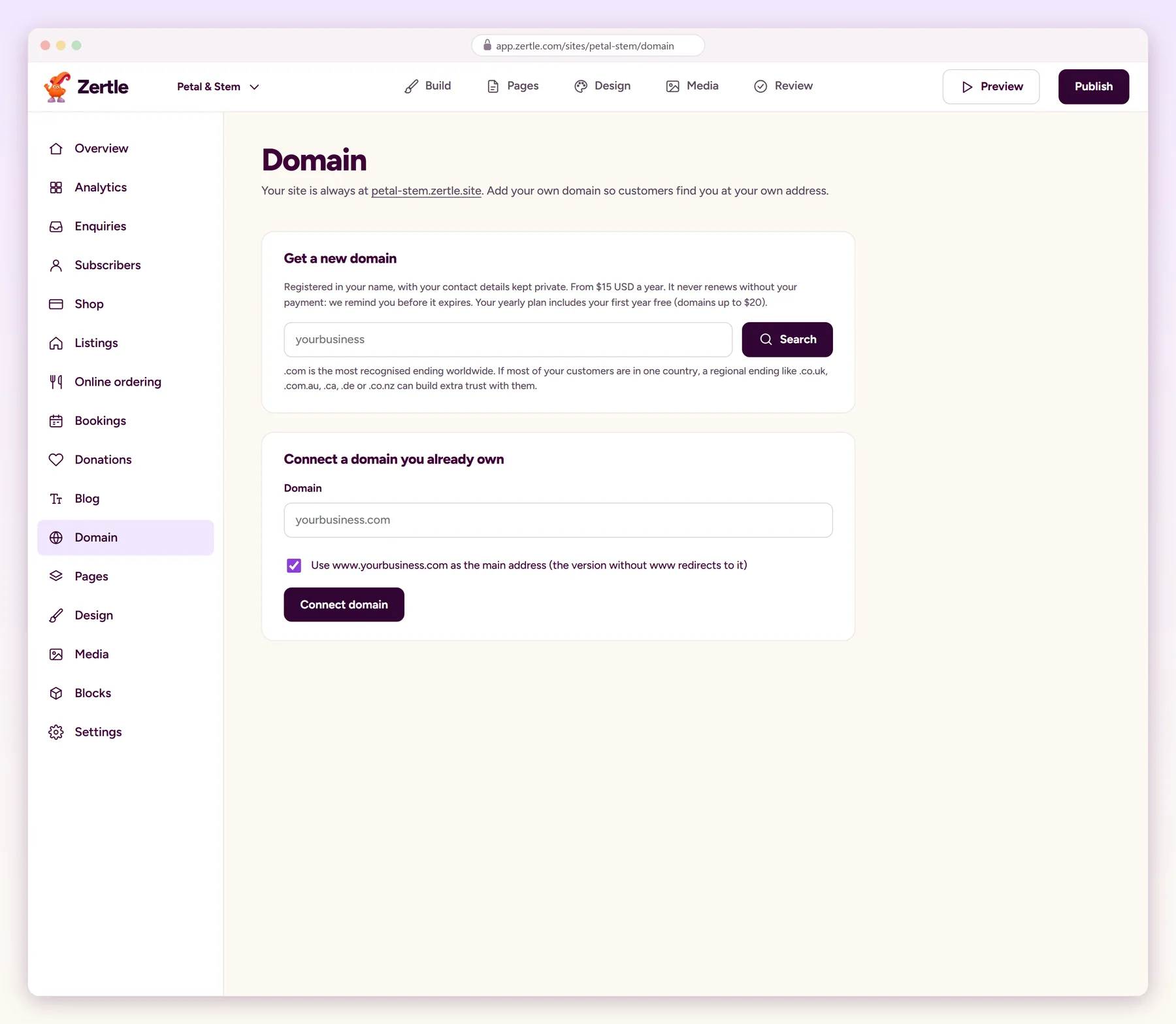
Free address
Publish to yourname.zertle.site on any plan, and change the name whenever you like.
Your own domain
Buy a new domain from US$20 a year, or connect one you own. Every paid plan billed yearly includes the first year of one domain up to US$20, and you pay just the difference for a dearer one (not on monthly billing).
Hosting and SSL included
Pages are served from a global network with a secure padlock on every plan.
Private pages
Password-protect a page, a section or the whole site.
Emails from your own domain
Elite: order emails, gift cards, reminders and campaigns come from your own address, like hello@yourshop.com. Add a few DNS records and Zertle checks them for you.
Member pages
Make pages only members can see. Visitors sign in with their email (no passwords) and join a free plan, or a paid monthly or yearly one through your own Stripe account. Business, Store and Elite.
Cookie banner
Let visitors know about cookies, or ask first before loading maps, videos and embedded content.
Backups and moving
Download a full backup or spreadsheets any time, restore a backup, take your site offline or transfer it to someone else.
Step-by-step guides: Use your own domainMember-only pages and membershipsPassword-protect a pageCookie bannerBack up, import and export
Team, media and account
Work together, keep your photos organised.
Invite your team with the right access for each person, keep every photo and video in one library, and manage your plan and billing in one place.
Included on Team members on Starter (up to 2), Business (up to 10), Store (up to 25) and Elite (up to 100)
Roles for everyone
Admins can do everything except billing. Editors design, write and publish. Contributors handle posts, products, orders, enquiries, bookings and reviews.
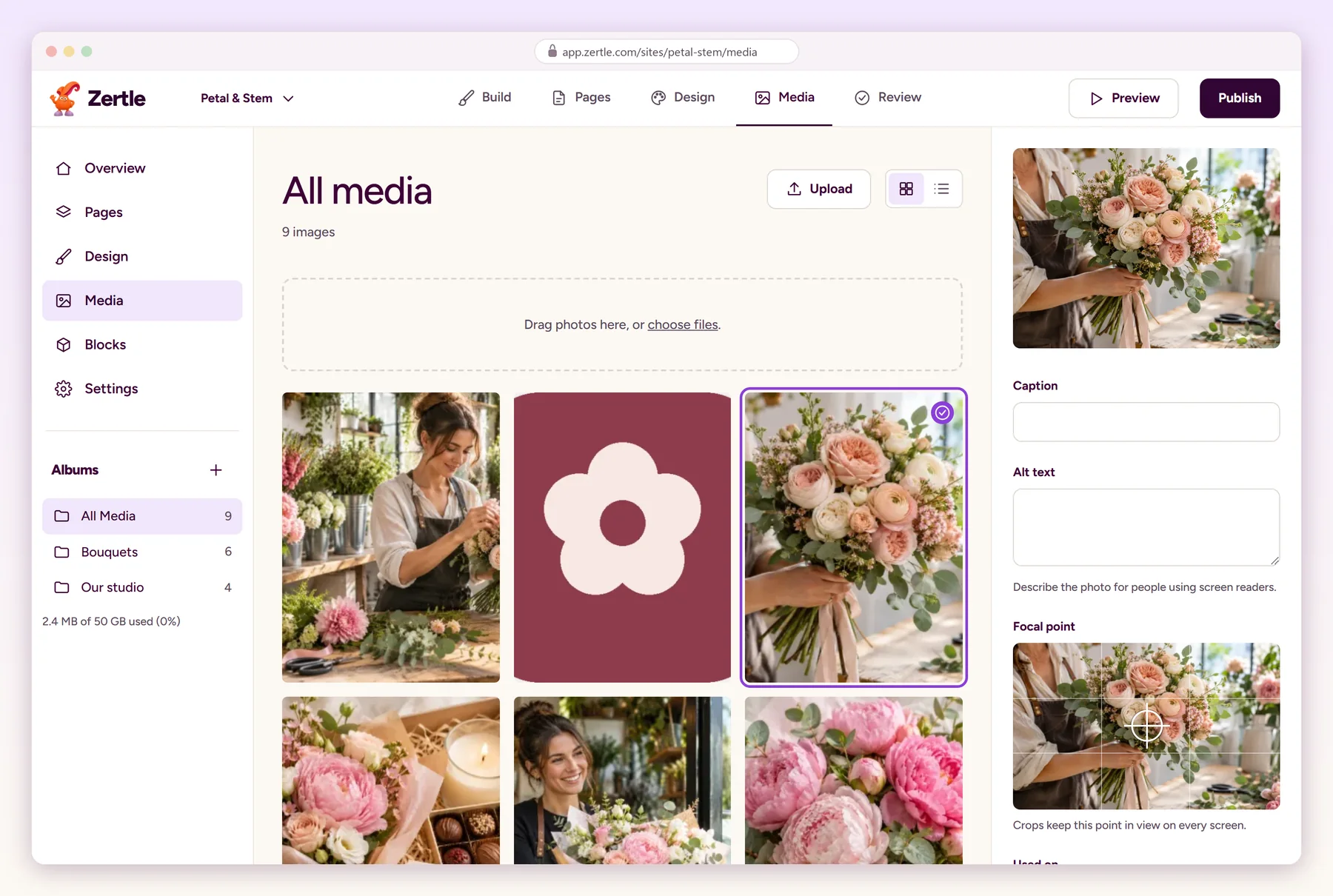
A media library
Upload photos and videos, organise albums, add alt text and captions, and set focal points so crops keep the important part in view.
Storage on every plan
2 GB on Free, 20 GB on Starter, 100 GB on Business, 200 GB on Store and 500 GB on Elite, shared by photos, videos, downloads and uploaded files.
Simple billing
Monthly or yearly (save up to 20%), prices in US dollars per website, no setup fee and cancel any time.
Step-by-step guides: Invite your teamPhotos and mediaPlans and billing
Plans
Which plan includes what.
Prices are per website in US dollars. Start free, and upgrade any time: your site keeps everything you've built.
| Feature | Free | Starter | Business | Store | Elite |
|---|---|---|---|---|---|
| Price (billed yearly) | Free | US$12/mo | US$22/mo | US$32/mo | US$59/mo |
| Hosting, SSL and every template | |||||
| Drag-and-drop editor, phone and tablet layouts | |||||
| Pages | 5 | 10 | 100 | 100 | 1000 |
| Your own domain | – | ||||
| No Zertle badge | – | ||||
| Storage | 2 GB | 20 GB | 100 GB | 200 GB | 500 GB |
| Zelly AI credits | 10 to try | 30/month | 80/month | 120/month | 400/month |
| Contact form with email alerts | |||||
| Photo galleries and albums | – | ||||
| Version history | – | ||||
| Blog and collections | – | ||||
| Custom and multi-step forms | – | – | |||
| Newsletter sign-ups | – | – | |||
| Online booking | – | – | |||
| Donations | – | – | |||
| Online shop | – | – | 25 products | 500 products | 25000 products |
| Listings | – | – | 25 listings | 500 listings | 25000 listings |
| Online food ordering | – | – | – | ||
| Discount codes | – | – | – | ||
| Payment links for deposits | – | – | |||
| Shipping zones | – | – | – | ||
| Stock and prices per variant | – | – | – | ||
| Revenue and product sales reports | – | – | – | ||
| Staff booking calendars | – | – | – | ||
| Google Analytics, Tag Manager and Meta Pixel | – | ||||
| Emails from your own domain | – | – | – | – | |
| Email automations | – | – | – | – | |
| Prices in shoppers' own currencies | – | – | – | – | |
| Advanced analytics | – | – | – | – | |
| Xero and QuickBooks | – | – | – | – | |
| Product subscriptions | – | – | – | ||
| Member pages and paid memberships | – | – | |||
| Email campaigns | – | – | |||
| Abandoned-cart emails | – | – | |||
| Gift cards | – | – | |||
| Team members | – | 2 | 10 | 25 | 100 |
| Zertle transaction fees | – | – | 0% | 0% | 0% |
Questions about Zertle.
More in the help centre.
What is Zertle?
Zertle is a drag-and-drop website builder for businesses, clubs and organisations of every size. You design your own site on a visual canvas, with hosting, SSL, phone layouts, forms, an online shop, bookings, food ordering, donations, listings, a blog, analytics and Zelly, an AI assistant, built in.
Do I need to know how to code?
No. Everything is visual: click to edit, drag to move and choose options from menus. Custom CSS is there for people who want it, but no feature depends on it.
Is Zertle free?
Yes. The Free plan lets you build and publish a real website of up to 5 pages on a free zertle.site address, with hosting, every template, a contact form and 10 Zelly credits. Paid plans start at US$12 a month billed yearly.
Does Zertle take a cut of my sales?
No. Zertle adds no transaction fees. Card payments go straight to your own Stripe account and only Stripe's card fees apply.
Are Zertle websites fast and good for search?
Yes. Pages are static and served from a global network, photos are resized and converted to WebP for every screen, and there are no tracking scripts unless you add your own. Zertle adds a sitemap and structured data automatically, and the publish check finds anything that would hurt search, speed or accessibility before you go live.
Can I move my existing website to Zertle?
Yes. Start from a template close to your current look and copy your words across. Blog posts import from WordPress or a spreadsheet, products from a spreadsheet, and redirects keep your old links and rankings working.
What happens if I stop paying?
Your site moves to the Free plan at the end of your paid period and stays online on your zertle.site address, within the Free plan's limits.
Build it yourself. Free.
No card needed to start. Upgrade when you want your own domain, a shop, bookings or your team.