- Add Customer reviews and Star rating parts to your product page design (the ready-made designs include them).
- Customers write reviews on product pages. Reviews from people who bought the product are marked Verified buyer.
- Check new reviews in Shop → Reviews.
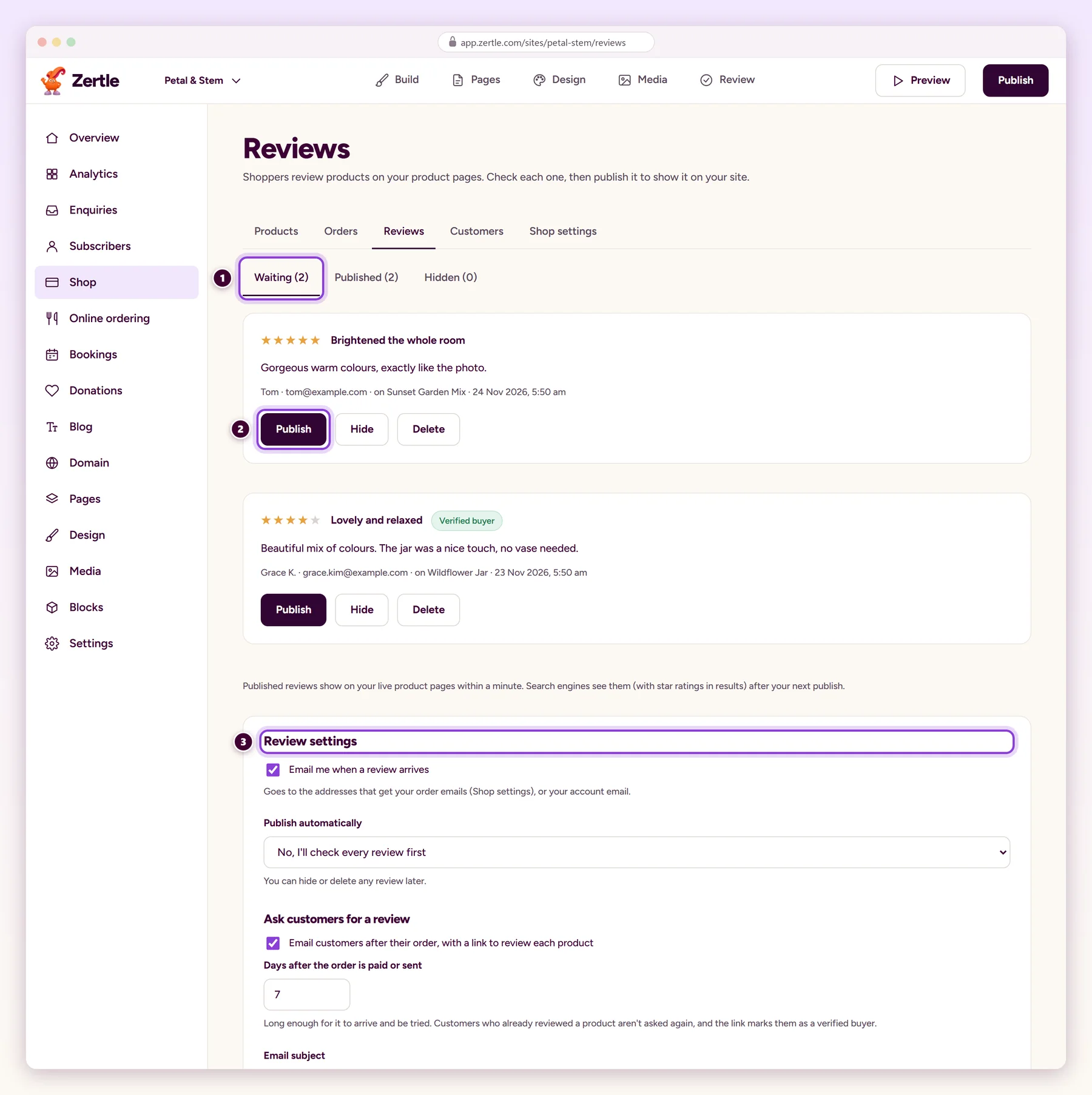
Check reviews
Reviews waiting for you are under Waiting. For each, choose Publish, Hide or Delete. Published reviews show on your live product pages within a minute. Search engines see them (with star ratings in results) after your next publish.
Review settings
| Setting | What it does |
|---|---|
| Email me when a review arrives | Sent to your order alert addresses, or your account email. |
| Publish automatically | No (check every review first), verified buyers' 4 and 5 star reviews, or every review. You can hide or delete any later. |
| Email customers after their order | A friendly email with a link to review each product they bought. |
| Days after the order is paid or sent | Long enough for it to arrive and be tried. Customers who already reviewed a product aren't asked again. |
| Email subject and Message | Your own words. Use {name} for the customer's first name and {shop} for your site name. |
Customers can also add photos to their reviews. See Photos in reviews.
← All online shop guides