Your dashboard at app.zertle.com is home base for everything that isn't design: enquiries, bookings, orders, posts, photos, domains and settings.
Your sites
After you sign in you see Your sites. Each site shows its web address and two buttons.
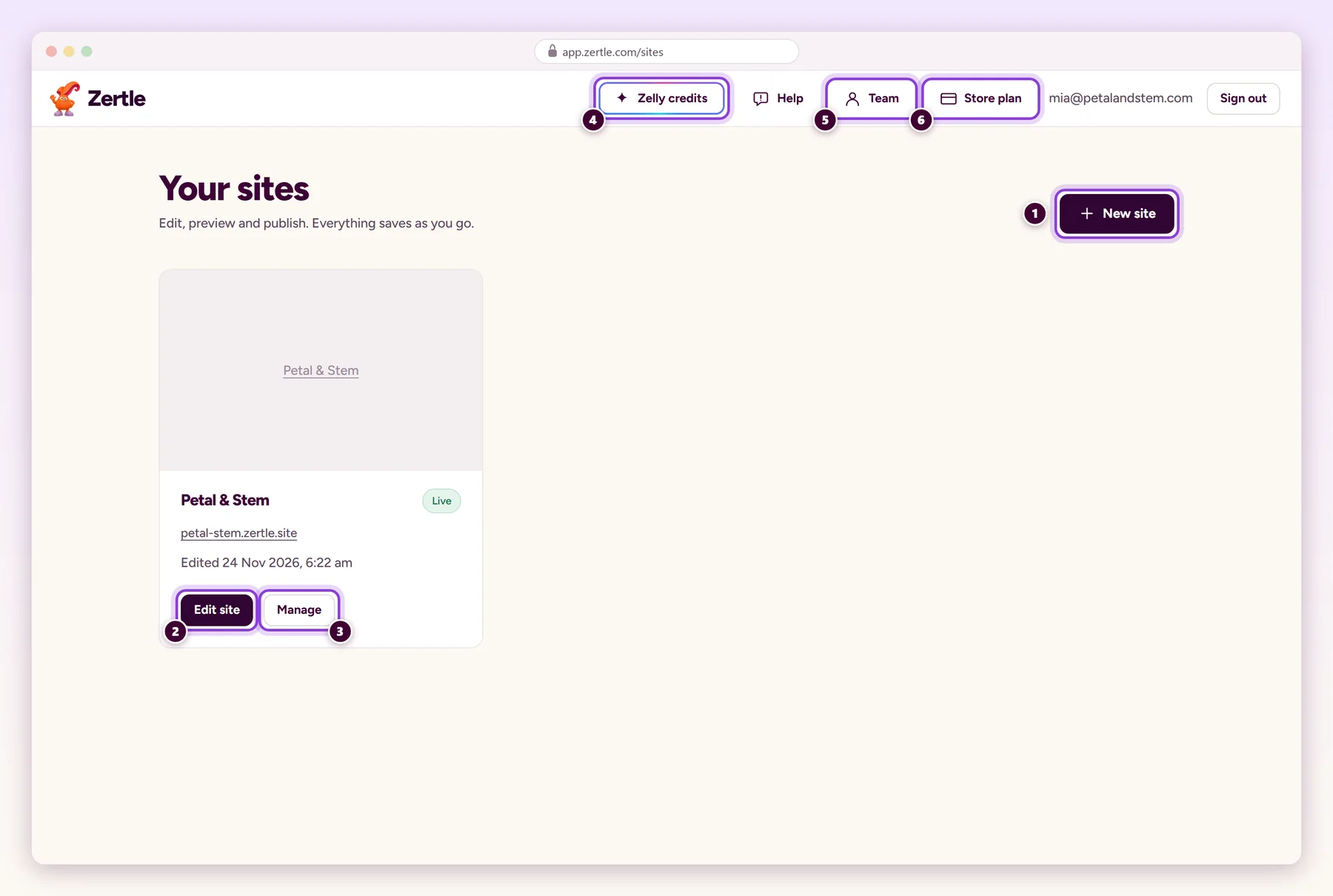
| Button | What it does |
|---|---|
| New site | Start another website from a template, a blank page or Zelly. |
| Edit site | Opens the site in the editor, where you design pages. |
| Manage | Opens the site's dashboard: enquiries, shop, bookings, settings and more. |
| Zelly credits | Your balance for Zelly, the AI assistant, and top-ups. See Zelly. |
| Help | Opens this help centre. |
| Team | Invite people to help with your sites: up to 2 on Starter, 10 on Business, 25 on Store and 100 on Elite. See Invite your team. |
| Your plan | Shows your current plan. Change or cancel it here. See Plans and billing. |
A site's dashboard
Choose Manage on a site to open its dashboard.
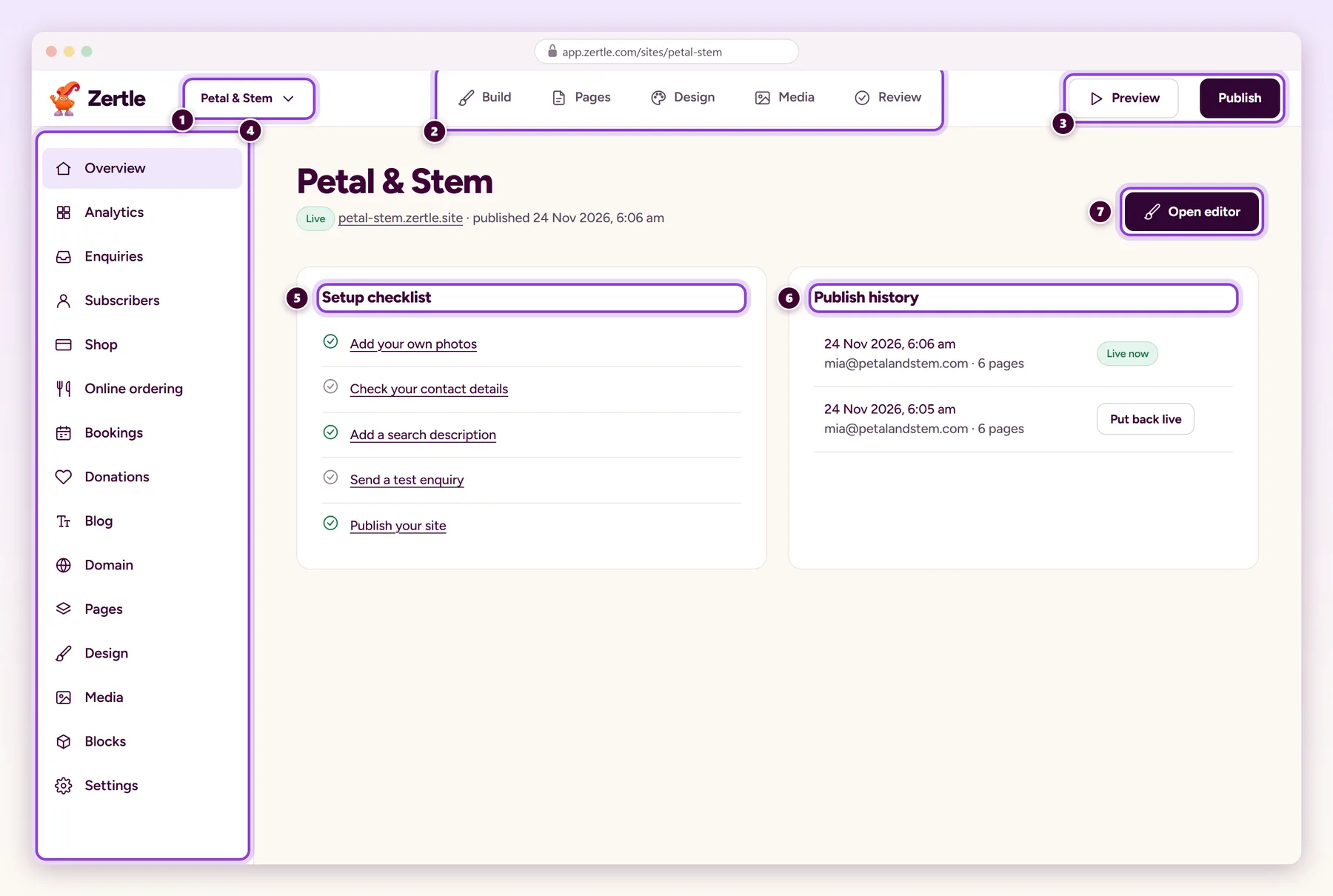
- Site switcher: the site's name at the top. Choose it to jump to another of your sites.
- Build, Pages, Design, Media and Review: shortcuts to the editor, your page settings, your colours and fonts, your photos and the side-by-side preview.
- Preview and Publish: see the site as visitors will, or publish your latest changes.
- The site menu on the left. Everything about this site, explained below.
- Setup checklist: the few things worth doing before you share your site. Each item links straight to where you do it, and ticks itself when it's done.
- Publish history: every time the site was published, by whom, and how many pages. Choose Put back live on an older one to make it the live site again (on Starter and above). Your draft in the editor isn't changed.
- Open editor: design your pages.
The site menu
| Item | What it's for |
|---|---|
| Overview | The page above: checklist and publish history. |
| Analytics | Visitors, top pages, where people come from, and what they turn into. Analytics |
| Enquiries | Messages sent through your forms. Enquiries |
| Subscribers | People who joined your mailing list. Subscribers |
| Shop | Products, orders, reviews, customers and shop settings. Set up your shop |
| Online ordering | Your food menu, ordering settings and the kitchen board. Online food ordering |
| Bookings | Appointments, calendar, clients, services and hours. Take bookings |
| Donations | Campaigns, gifts and receipts. Accept donations |
| Blog | Your blog, projects or listings. Start a blog |
| Domain | Use your own web address. Use your own domain |
| Pages | Page titles, addresses, search settings, passwords and redirects. Pages |
| Design | Opens the editor's colours and fonts. Colours and fonts |
| Media | Every photo on the site. Photos and media |
| Blocks | Reusable headers, footers and sections that update everywhere (coming soon). For now, duplicate a section or copy it to another page. |
| Settings | Site name, address, description, import and export, going offline and deleting. Site settings |